On the 04 February 2022 I decided to switch from FreeAPS (Loop) over to AAPS. At that point I had been successfully looping for 6 months with FreeAPS (Loop) but I wanted to get some experience with the oref1 algorithm in the hopes of fine-tuning my diabetes management during sports and to try out unannounced meals.
I was conflicted in the beginning as I was seeing results consistent with my goals on FreeAPS (Loop), but It was something I wanted to try. I am glad that I did.
The first few weeks on AAPS can be painful as you learn the system and go through the objectives. I had completed as many as I could using a virtual pump so It wasn’t long before I was able to close the loop again this time using AAPS. I expect my numbers will improve once again when automations are available to me.
Setup and Configuration:
For the first few days I was still using the Dexcom IOS app as my collector app sending my BG readings to the King King Mini 2 (KKM2) to be processed by AAPS, this worked well as I was always in areas with reception. I did this because I wanted to be able to switch back to Free-APS quickly if I decided that AAPS wasn’t working for me. The first sensor on the KKM2 I paired with xDrip+. I loved xDrip as it provided heaps of additional data, but I had issues with delayed and missed readings. I have now switched to the the Dexcom BYOD app and this seems to be proving readings more consistently. I am using an Anubis transmitter but I am unable to validate battery level with the Anubis Tool on the KKM2.
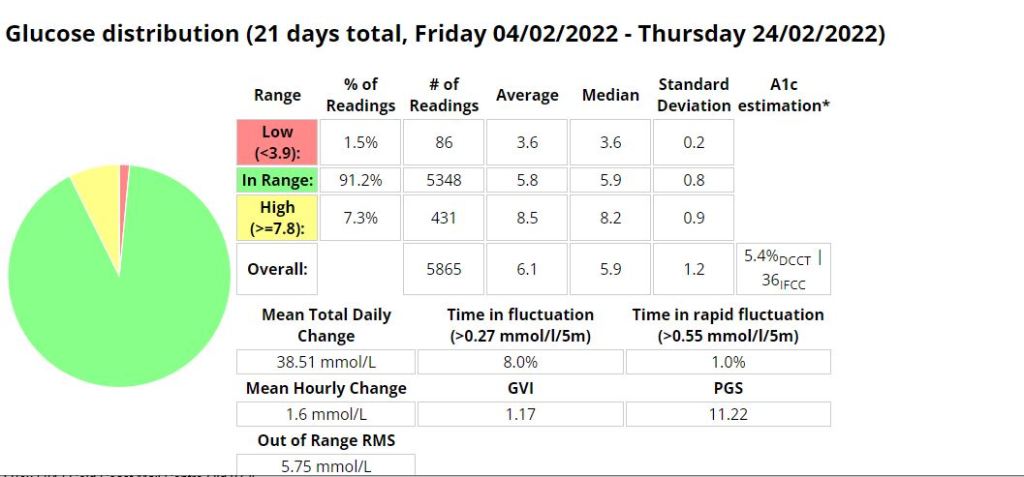
Stats:

…
Likes:
- Improved Time-in-range (TIR) (+7.7 %), average blood glucose (-0.2 mmol/l), GVI, PGS and A1C even though AAPS was new to me and I was still figuring a few things out. I achieved this exercising less than I usually do due to weather.
- Better control with less work.
- More flexibility – The ability to scale and tailor your meal or correction dose is awesome (include trend, IOB, COB, correction percentage and your blood glucose readings in the the calculation for increased control and precision).
- Fewer (0.2% less) low events.
- Quicker to respond to bring high blood sugars down.
- Unannounced meal management (UAM) using the Oref1 algorithm (not tested).
- No Apple Developer licence fee (I paid less for my KKM2 than I was paying for my annual developer license).
- Easier to setup and deploy to the KKM2 than the Free-APS (Loop) app.
- Remote (SMS) bolus.
- The ability to super bolus (include basal for a specific period with a bolus).
- Super micro bolus’ (SMB) are more effective at dealing with gluconeogenesis from high protein meals.
- Autosens has been useful by identifying periods of insulin resistance or sensitivity and adjusting basal accordingly.
Dislikes:
- My pump (Medtronic 522) is using batteries more frequently (60% quicker on AAPS).
- Bluetooth (BT) drop-outs more frequently than loop. In the last 21 days I have had 6 ‘Pump unreachable’ errors and 3 ‘Missed BG readings’. This resulted in elevated blood glucose during the evening.
- The KKM2 battery drains faster when I am around multiple other Bluetooth enabled devices than what the iPhone did.
- The connection between the Phone (King Kong Mini 2) to the Orangelink and pump seems a little less stable than with the with the iPhone and loop, but I suppose you can expect a far inferior Bluetooth chip on a phone that costs a 10th of the price. This is easily remedied by restarting the Orangelink , turning BT on and off or in some cases, usually with the the pump unreachable error, I had to restart my phone.
- I really liked the ICE (Insulin Counteraction effect) data in Loop. It was useful to see where I went wrong with my previous bolus and AAPS doesn’t have this data readily available like Loop did. If you were using UAM it would be unnecessary.

 Dick The Diabetic's APS Adventures