Android APS – AIMI, Boost & EN

The efficacy of any AID (Automated Insulin Delivery) device is directly proportional to the amount of insulin it provides in relation to your needs, and everybody’s needs are slightly different. To ensure safety the native AAPS loop only administers 50% of the calculated insulin requirement per loop cycle. This limitation can be overcome by using one of the branches I mention below, or by profile switching, using temp targets and automations.

AIMI

Pros:

  • A ton of unique features seen nowhere else (dynamic SMBRatio, DIA change for every SMB or Bolus, if TIR above 180 during the last two hours and up of 30 % the profile during the next hour if it’s still the case,if the TIR below 75 one hour before and reduce the profile during the next hour,calculation to propose one basal value for the day,A new function is working, after the manual bolus > iTime_starting_bolus, AIMI will force the basal 500% during the next 20 minutes.)
  • Frequent updates
  • A lot of collaboration with the diabetic community.

Cons

  • The DEV branch takes much longer to calculate cob using my KK mini 2. This can result in periods where I think insulin may be delivered later than preferred.
  • The battery life of your loop device is significantly impacted due to multiple calculations.
  • Watch seems to be less stable with more periods of stale data
  • More frequent pump disconnects.

Thoughts: I don’t think I gave this a fair go. I should have adjusted to use less insulin. I think this is more suitable to people using UAM.
AIMI
AIMI

BOOST

Pros:

  • Best control I have ever had
  • Adjustable and scalable insulin required percent (SMBRatio). example. You can set Boost to provide 75% of the required insulin %, but if the glucose deltas are greater that percentage can increase to a maximum of 150%.
  • The setup process is straight forward.

Cons:

  • Less frequent updates

Thoughts: Suitable for people who enter carbs or who use UAM. Works well with Dash pods.
BOOST
Boost

Eating Now

Pro:

  • Frequent updates
  • A lot of unique features seen nowhere else (too many to mention here, read the docs)
  • Excellent documentation
  • The reasons (device status) behind why the system is adjusted are well documented and clear in the loop status and the documentation.
  • Lots of safety functions in the code.

Con:

  • You can adjust insulin required percentage but its (as far as I am aware) a static value.

Thoughts: Works extremely well when entering carbs and pre-bolusing.

Android APS – Adjusting Boost after testing AIMI

An interesting set of results from my time with Boost. I cant wait to return to AIMI with what I have learned.

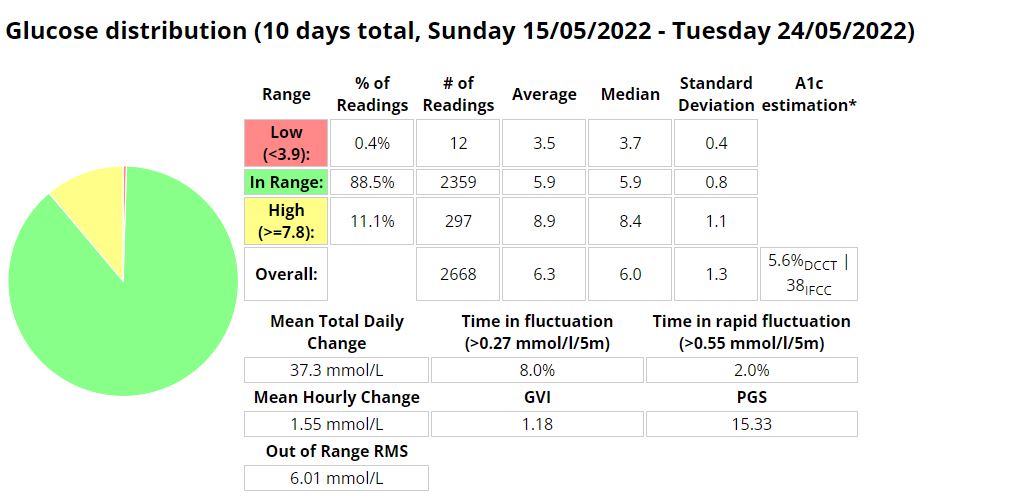
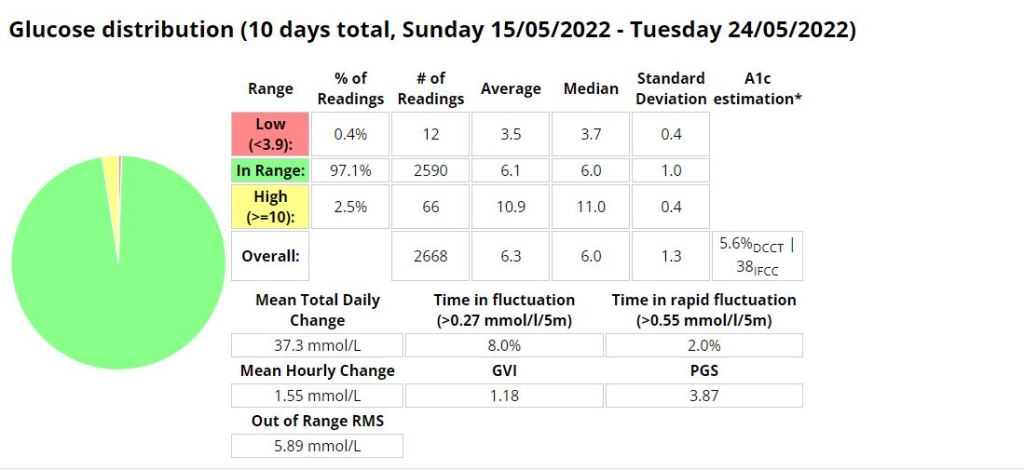
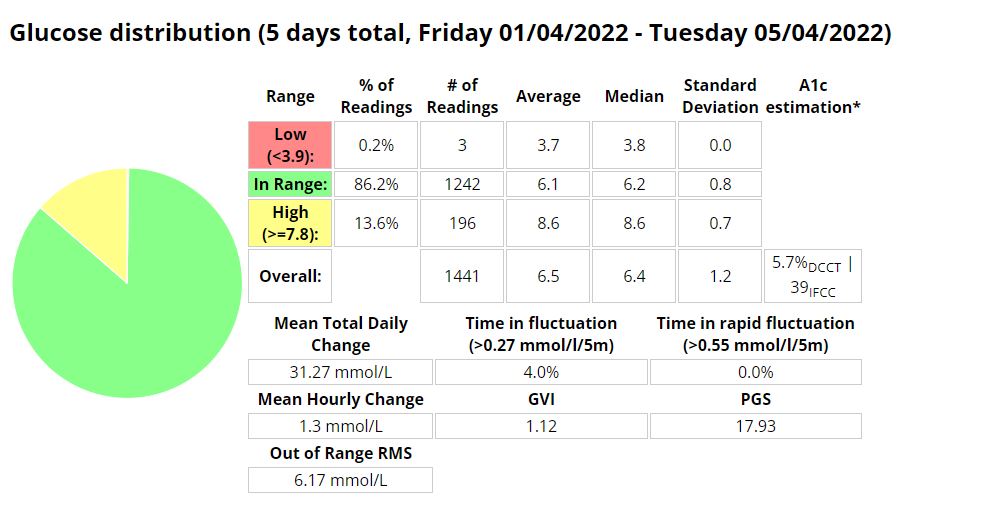
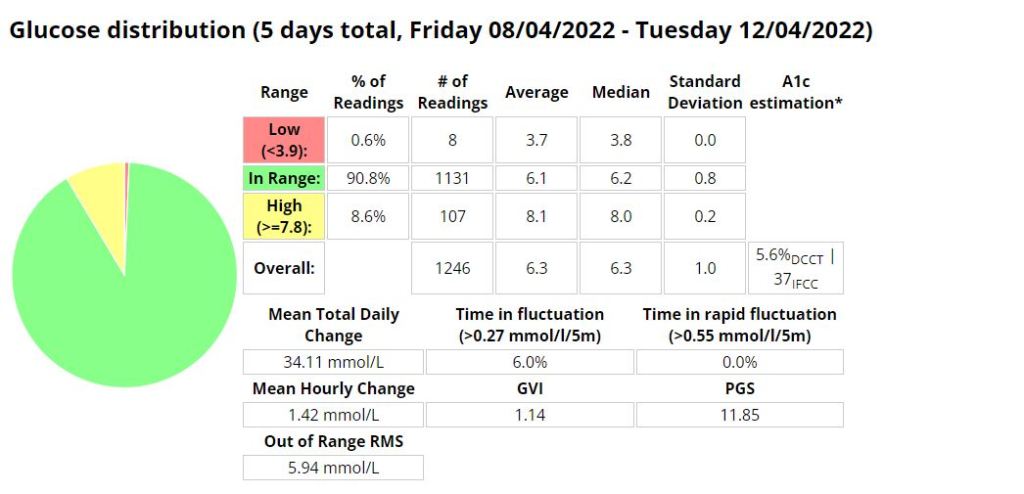
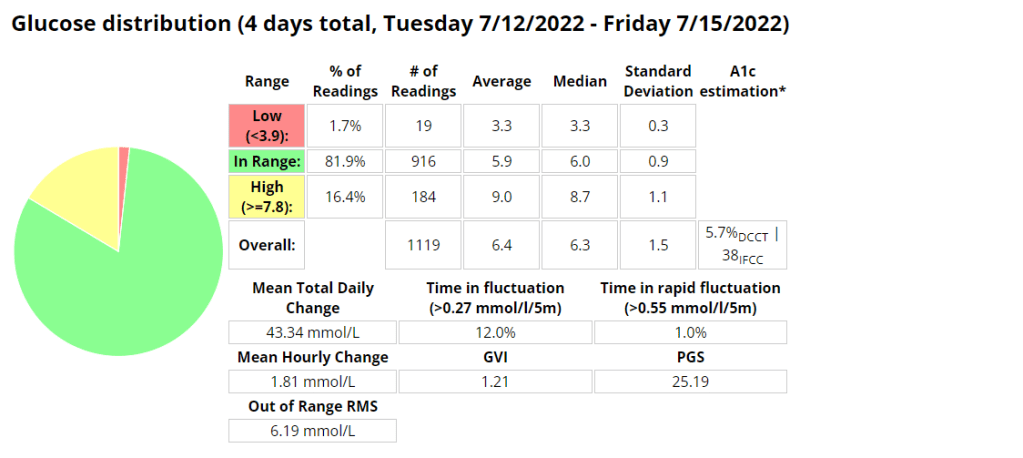
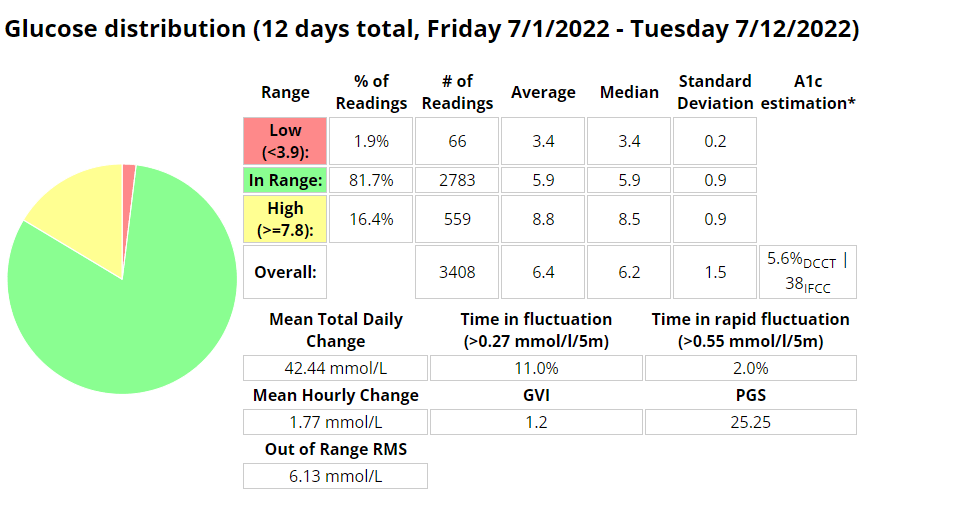
I was eating slightly less carbs (118g vs. 136g) than when I was using AIMI, but I would expect that if your profile is setup correctly that the amount of carbs shouldn’t have much of an impact on performance metrics. I was running into a few hypos so I lowered the algorithms insulin required percentage (70% vs. 100%) which resulted in a whopping 1.6% decrease (57 minutes vs. (288 minutes / 4.8 hours)) of time spent in a hypoglycaemic state while using Boost.

My standard deviation was slightly lower (1.3 vs. 1.4) signifying less fluctuations between readings while my time in a hyperglycaemic state went up 0.6% (25.2 hours vs. 26.6 hours)).

I did have to turn off “enable boost percentage scale” as this was providing too much insulin, but more experimenting could remedy this.

Another interesting observation was that my ratio between total daily dose (TDD) and total carbs eaten went down from 4.2 to 4.01 (grams of carbs per unit of insulin) as my average blood sugar lowered.

My exercise seems to have stayed pretty consistent during testing (as per the table below) which leads me to believe the reduced insulin need may be related to requiring less insulin when blood sugar is euglycemic. Its going to be a little more difficult to track that for the next few weeks as I am preparing to ramp up training for the Southern Cross 10km in July. The training has however provided an opportunity to fine tune my running routine as outlined here in my post about predicting blood sugars while running.

I cant wait to do some further testing with AIMI, Boost and Eating now.

Table of performance metrics from when I was MDI to the latest build of Boost.
Boost Stats (70% insulin required)
AIMI Stats (100% insulin required)
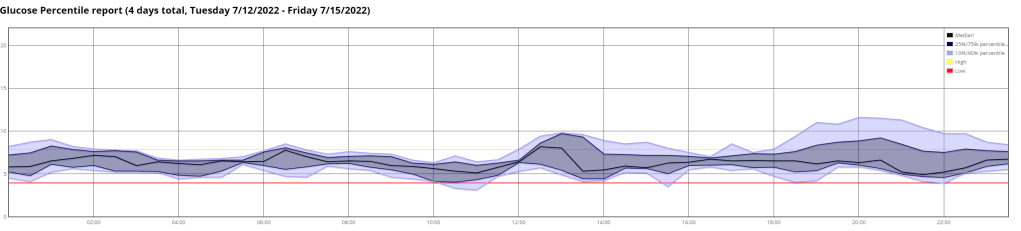
Boost TIR stats 3.9 – 10mmol/l
Exercise table (stats derived from Strava and Python scripts)

Dynamic Insulin Sensitivity Factor (ISF)

Dynamic ISF is all the buzz in the diabetic community at the moment, and so it should be! In the first few days of using it I was able to see marked improvements with little to no intervention as the algorithm scaled my correction doses.

What is Dynamic ISF

Your insulin sensitivity factor (ISF) is how much one unit of insulin will lower your blood glucose. Simply put dynamic ISF uses your total daily dose (TDD) of insulin to scale this value depending on blood sugar.

My results

So far the results have been astoundingly positive.

Before D-ISF : Average TDD: 30.1, Average Carbs :138g
Using D-ISF: Average TDD: 25.1, Average Carbs :102g

Update:

Using D-ISF for one (1) month. A little bit of an unfair test as I had 3 sensors fail during this period, which resulted in many issues with sensor accuracy.

Formula

ISF = 277700 / ( BG * TDD )

Differences in the GUI (when using DEV)

As you can see in the picture below, the yellow square highlights the time the loop last ran, and the red square shows the profile ISF vs. the calculated dynamic ISF.

Home screen of AAPS

It’s interesting to note that the D-ISF code isn’t implemented when using the calculator, its only actively scaling ISF using SMB’s (and maybe basal %). This will mean your normal profile ISF is going to be used when eating a meal. If you have never tested your ISF It may be worth while checking what the scaled ISF is at meal time (provided your BG is perfect) and setting your profile to that value if the values are vastly different. This is also providing that you aren’t in a period of significant resistance or sensitivity.

The Dynamic ISF plugin you will obtain in the config builder of the Dev code.

Where do I get a copy of the AAPS Dynamic ISF branch

It is in the same repository as the standard (master) version of AAPS. In order to use it you will need to select a different branch of AAPS (dev) and build that branch. I suggest you read Tim Streets repo notes for a more in depth description of the code and its functionality, even though you will not require the code from that repository. You will need to enable engineering mode on the phone in order to utilise the dev branch.

https://github.com/nightscout/AndroidAPS

I’ll write a post about building in the next few days.

Ciao for now!