Thirty day challenge

It’s spring, and after a brief ‘almost two months’ of going off the reservation snacking at all times of day and barely exercising, I decided to check my weight. I discovered I had picked up a few kilograms since my last weigh in. After learning this, I decided that it was time for me to get my life back together and start another 30 day challenge. I find these great to provide the reason to get back into a routine.

I know that setting unrealistic goals (like losing 5kgs) isn’t going to work, so I’m going to break down my plan in to nutrition, exercise and diabetes goals.

Exercise

My plan for the month is to gym three days a week, run a minimum of 2 times per week and to mountain bike at least once a week. (So I guess I lied about setting unrealistic goals 🙂 )

Nutrition

For my meals I plan to stick to my usual low-ish carbohydrate meals during the week and try to only go coo-coo bananas on the late night snacking over the weekend. I’ll start carb-counting again as this will almost always yield the best results. This will be supplemented with 2-3 liters of water, depending on length of cardio that day.

Diabetes
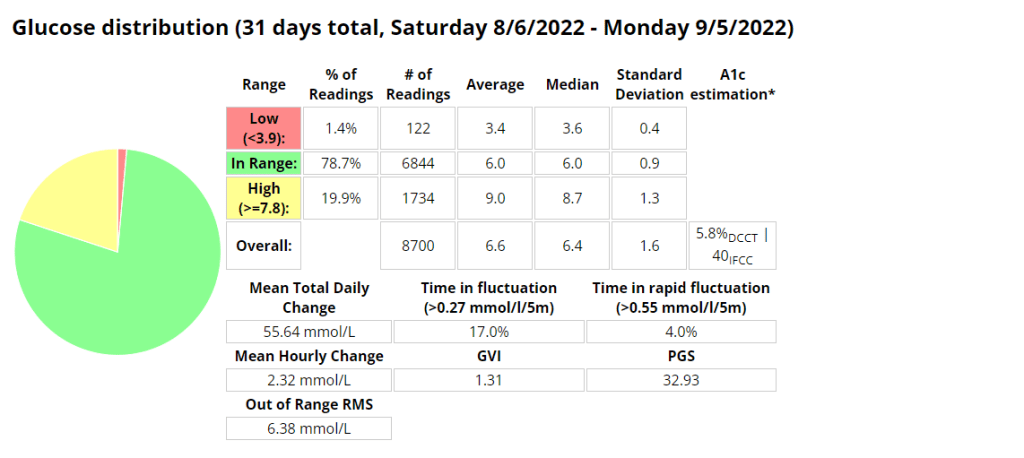
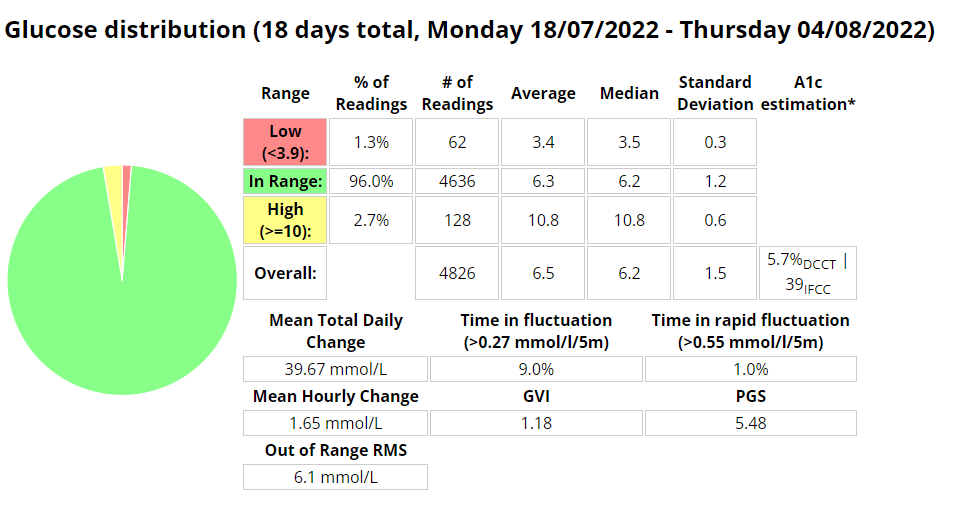
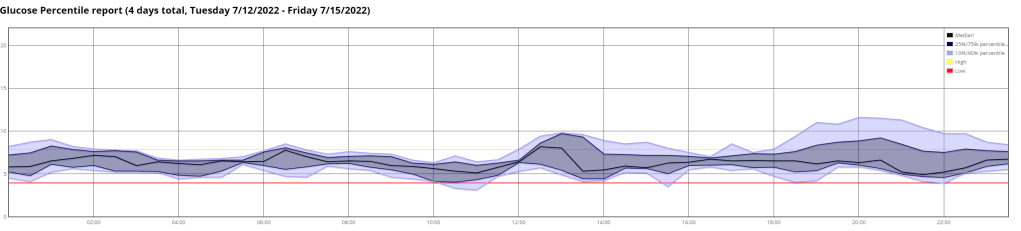
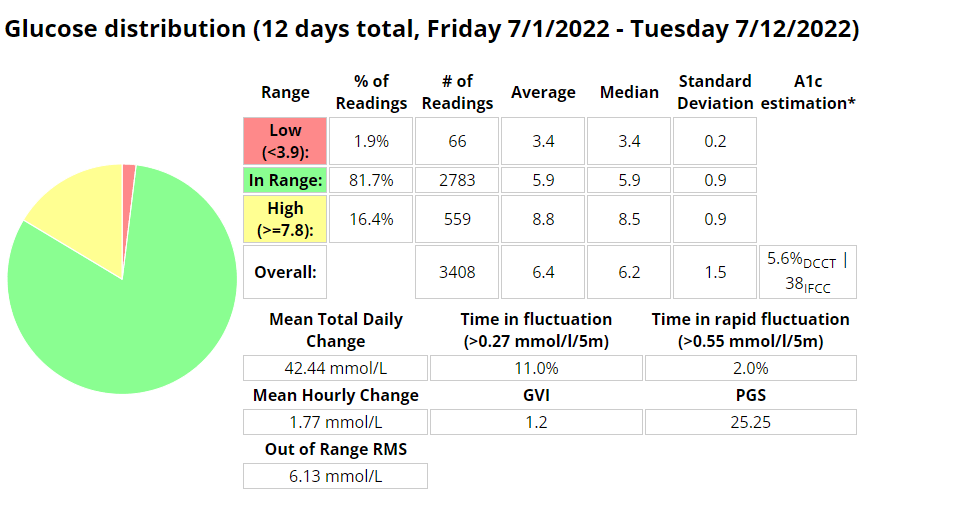
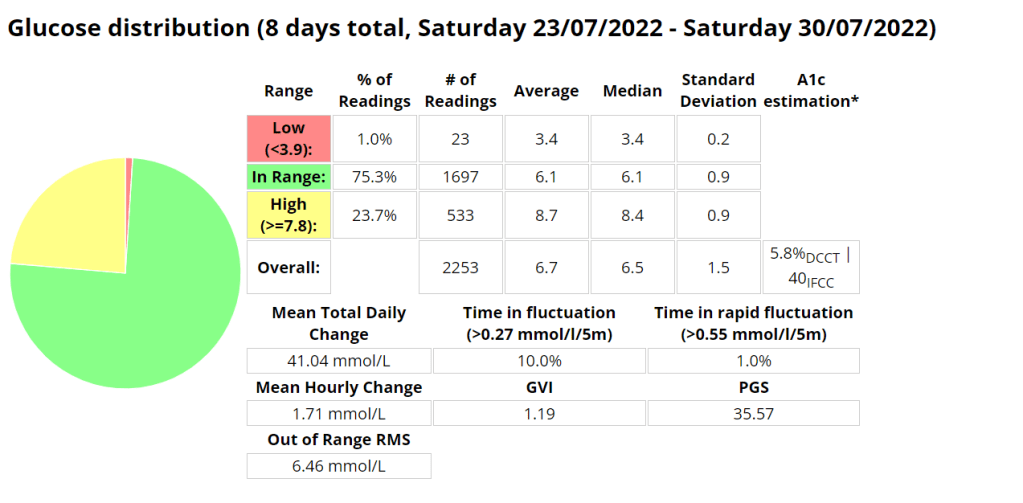
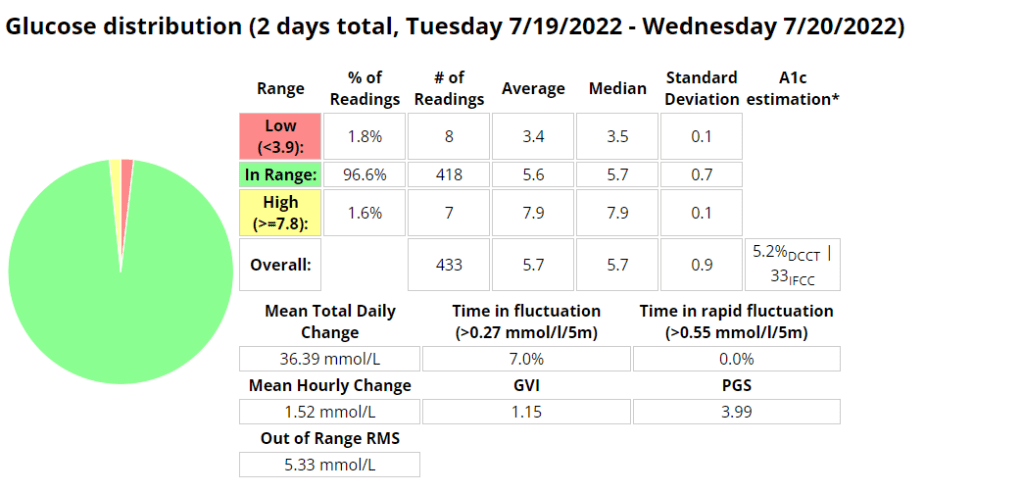
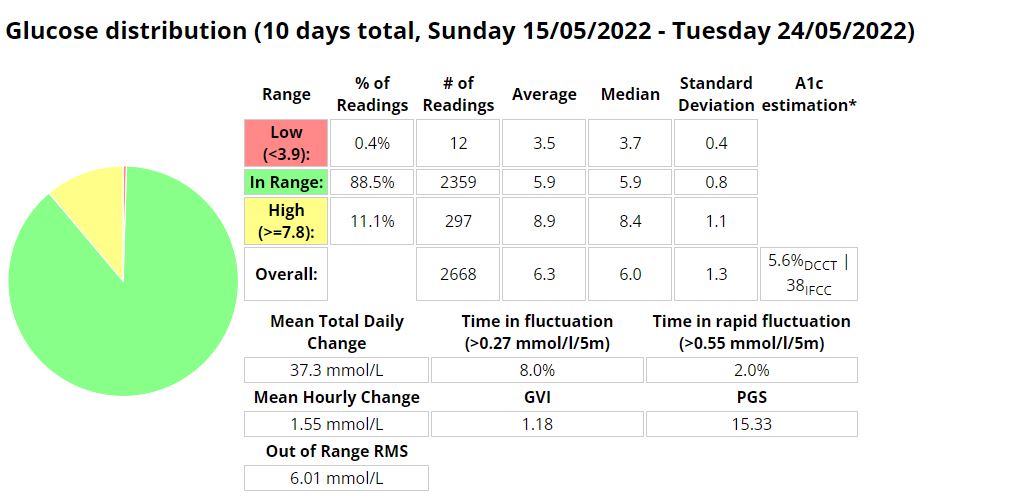
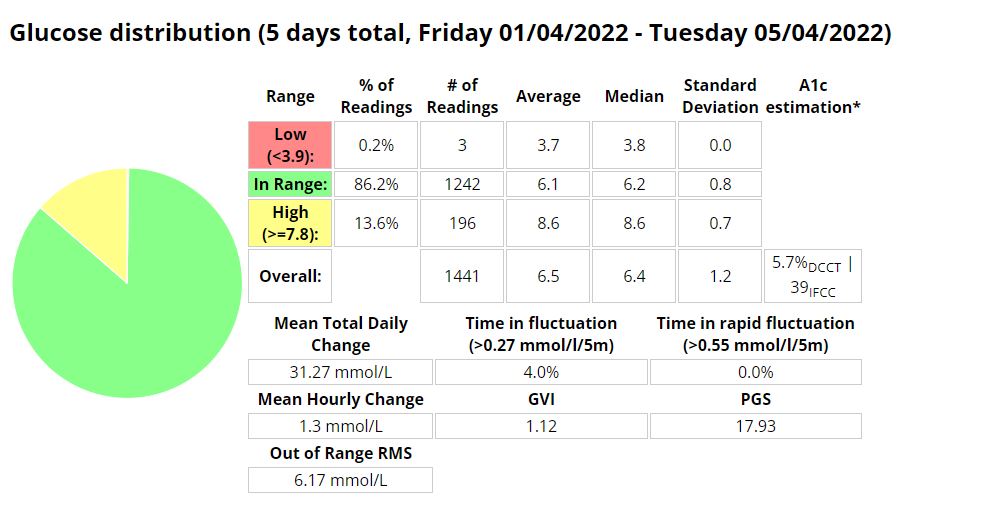
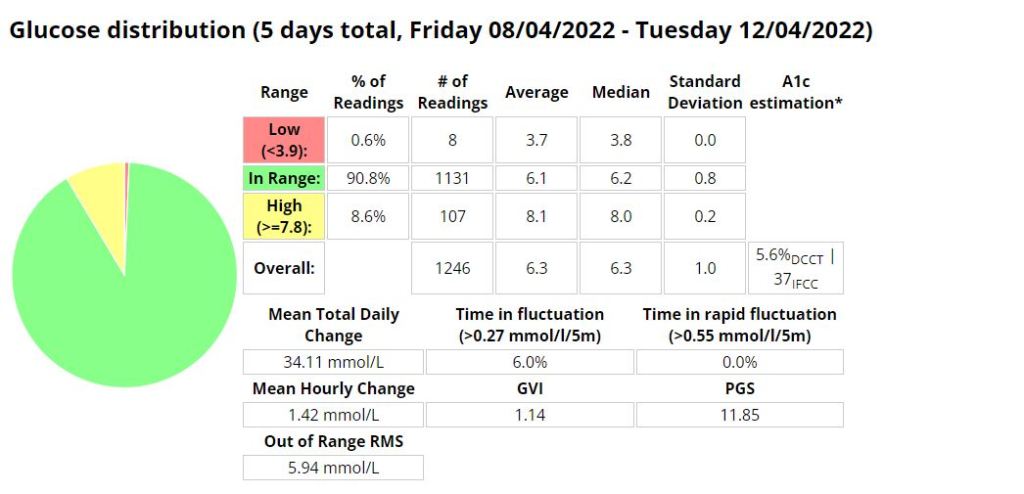
Above is a chart of my starting metrics. Lets see how quickly I can improve those values. Its going to be a little bit of an unfair test as I was not carb-counting during the above period.

We want to see the In range (Time-in-range) increase and the standard deviation decrease. By doing that the average and the A1c should follow. This will mostly be achieved by the diet component of the plan. The exercise component will allow me to eat more cabs and require less insulin, as well as improve circulation, sleep, blood pressure, mood, cholesterol, memory and overall mental and physical health.

I will check in with weekly updates to ensure I keep motivated and accountable.

Video overlay description

I have been working on a repeatable process to create YouTube videos that contain my AndroidAPS (AAPS) device data stored in Nightscout. My first attempt used a Python script to export a CSV file. This needed to be started by saving a note in Nightscout, which I often forgot to do just before I started riding. My most recent update stores the devicestatus (https://your-nightscout-site/api/v1/devicestatus) API call into a database and does not require any external trigger to start the logging process. This data is updated every five (5) minutes as a calculation cycle completes in AAPS. The below is an explanation of some of the fields I am exporting.

Description of values present in the video:

  • IOB (Insulin-on-board) – The amount of active rapid-acting insulin you have in your body.
  • COB (Carbs-on-board) – The estimated number of grams of carbohydrates in your system that are waiting to be absorbed into your bloodstream
  • Basal – The primary job of basal insulin is to keep your blood glucose levels stable during periods of fasting, such as while you’re sleeping
  • Uploader battery – The battery % of the uploader device.
  • BGI (blood sugar impact) – The algorithm uses BGI (blood glucose impact) to determine when carbs are absorbed.
  • Insulin Required – The amount of insulin the algorithm calculates you require to return to a euglycemic state.
  • Finger prick BG – The blood sugar reading from a standard finger prick test.
  • Blood sugar – The CGM blood sugar value.
  • CSF (carb-sensitivity-factor) – The carb rise ratio (by some also called CSF, carb sensitivity factor) describes by how many mg/dl our glucose rises per gram of absorbed carbohydrate.
  • Dynamic ISF (insulin-sensitivity-factor) – An insulin sensitivity factor (ISF) or correction factor describes how much one unit of rapid or regular insulin will lower blood glucose. Dynamic ISF is calculated based on your total daily dose of insulin.

Omnipod Dash – Summary – Week 1&2

Its only been a week and already I feel so comforted by the barely audible click of the pump depressing the plunger in the mini pump at meal times or sporadically throughout the day. Its the sound of blood sugar control. What a week its been learning all I can about Pod changes and being woken up on day 3 by the Pod alarm alerting me its 8 hours before the Pod expires. Once expired it was interesting to note that the Pod functioned as per normal, apparently for another 8 hours.

I had a Pod on days 3 and 4 that was inserted into my leg that may have had a cannula issue, as I struggled to maintain my standard level of control.

Its been a lot easier to exercise focusing on enjoying the task rather than if I would break the pump or rip out a cannula. Having no wires makes it a lot easier to run or gym as I don’t have to worry about pump placement as much. Previously I needed to ensure I had pants with pockets or a belt clip available.
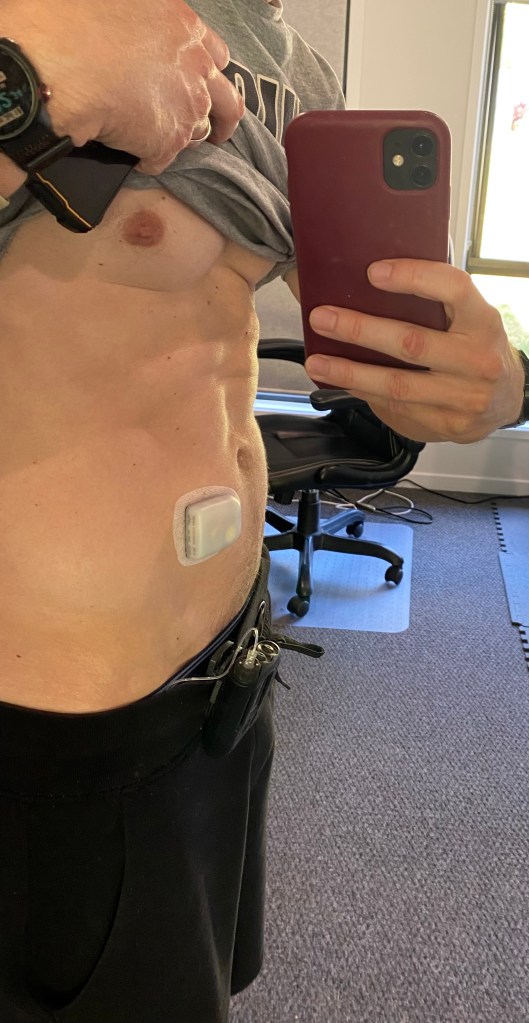
I have also found sleeping a little easier, as I can barely notice the pump If I roll over onto it.

Flank insertion.
Boost Omnipod – Time in Range (3.9 -7.8 mmol/l)
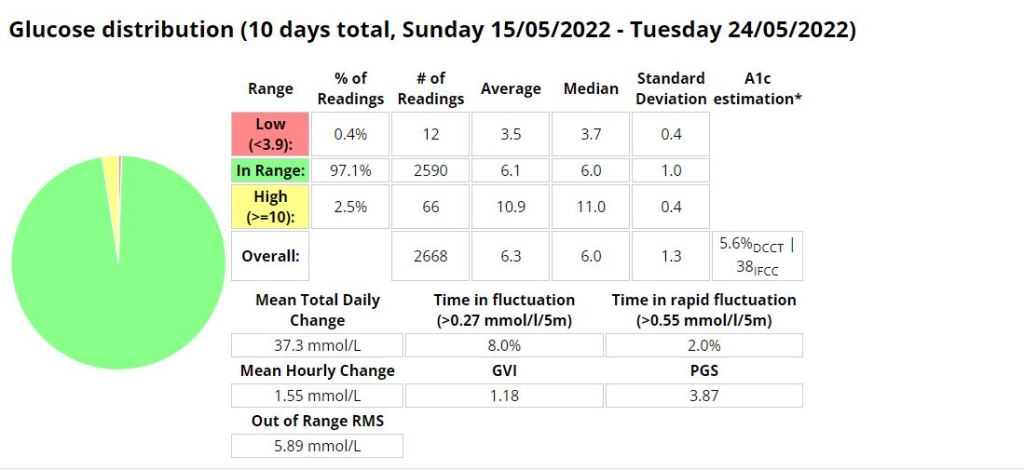
Boost Omnipod – Time in Range (3.9 – 10 mmol/l)

Unannounced meals

I decided to test the system with unannounced meals consisting of 40g of carbs or less. I am a bit of a control freak when it comes to diabetes so I have been postponing testing this for a long time. The results were outstanding. I will be writing more about this in the future, including any automations I use or test.

Boost Omnipod – UAM – Time in Range (3.9 -7.8 mmol/l)

Boost Omnipod – UAM – Time in Range (3.9 – 10 mmol/l)

Android APS – AIMI, Boost & EN

The efficacy of any AID (Automated Insulin Delivery) device is directly proportional to the amount of insulin it provides in relation to your needs, and everybody’s needs are slightly different. To ensure safety the native AAPS loop only administers 50% of the calculated insulin requirement per loop cycle. This limitation can be overcome by using one of the branches I mention below, or by profile switching, using temp targets and automations.

AIMI

Pros:

  • A ton of unique features seen nowhere else (dynamic SMBRatio, DIA change for every SMB or Bolus, if TIR above 180 during the last two hours and up of 30 % the profile during the next hour if it’s still the case,if the TIR below 75 one hour before and reduce the profile during the next hour,calculation to propose one basal value for the day,A new function is working, after the manual bolus > iTime_starting_bolus, AIMI will force the basal 500% during the next 20 minutes.)
  • Frequent updates
  • A lot of collaboration with the diabetic community.

Cons

  • The DEV branch takes much longer to calculate cob using my KK mini 2. This can result in periods where I think insulin may be delivered later than preferred.
  • The battery life of your loop device is significantly impacted due to multiple calculations.
  • Watch seems to be less stable with more periods of stale data
  • More frequent pump disconnects.

Thoughts: I don’t think I gave this a fair go. I should have adjusted to use less insulin. I think this is more suitable to people using UAM.

AIMI
AIMI

BOOST

Pros:

  • Best control I have ever had
  • Adjustable and scalable insulin required percent (SMBRatio). example. You can set Boost to provide 75% of the required insulin %, but if the glucose deltas are greater that percentage can increase to a maximum of 150%.
  • The setup process is straight forward.

Cons:

  • Less frequent updates

Thoughts: Suitable for people who enter carbs or who use UAM. Works well with Dash pods.

BOOST
Boost

Eating Now

Pro:

  • Frequent updates
  • A lot of unique features seen nowhere else (too many to mention here, read the docs)
  • Excellent documentation
  • The reasons (device status) behind why the system is adjusted are well documented and clear in the loop status and the documentation.
  • Lots of safety functions in the code.

Con:

  • You can adjust insulin required percentage but its (as far as I am aware) a static value.

Thoughts: Works extremely well when entering carbs and pre-bolusing.

Unannounced meals – Week 1

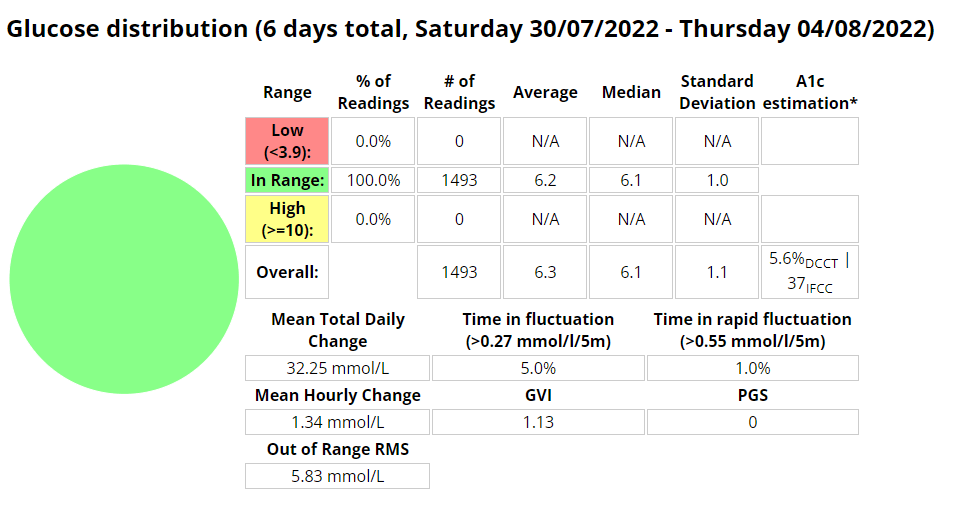
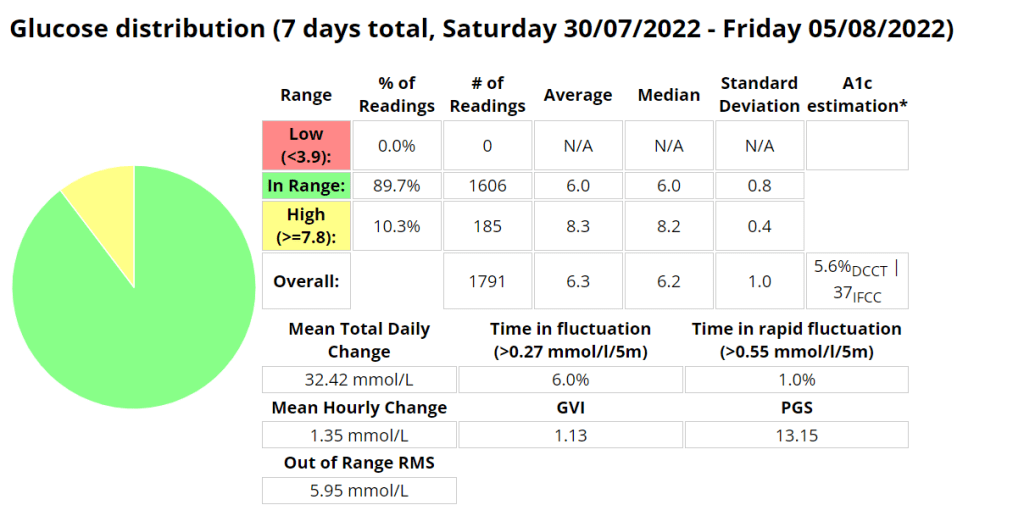
I started testing unannounced meals in Android APS on Saturday 30 July 2022. I am a bit of a control freak and really couldn’t believe that a system could manage my diabetes better than I could. I had more information available to me to make more informative decisions “I would tell myself”. But I seem to be wrong, well at least partly. I am using a branch of AAPS that delivers insulin early, but I found that managing protein and fat was more problematic than carbs seemed to be. Stubborn high blood sugar that seemed to take a few hours to correct. So I decided to do a little testing with automatons to try and improve those numbers.

Boost UAM stats (Time in range 3.9-7.8 mmol/l)
Boost UAM stats (Time in range 3.9-10 mmol/l)

Announcing carbs and pre-bolusing

Eerm…what? How is this possible? It seems with accurate carb counting I still cant account for digestion times as well as AAPS can.

Automations

I use two (2) automations to try and manage my readings more closely. These automations are over and above the Boost logic that provides insulin earlier than the standard code.

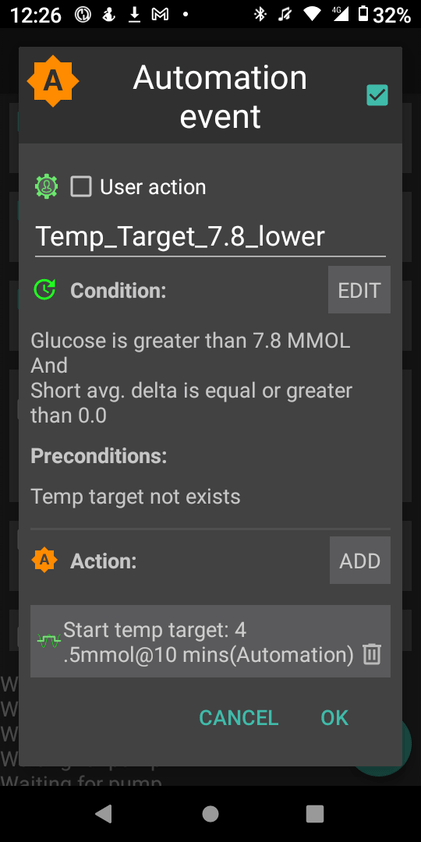
The first automation simply sets a lower target when my reading is above 7.8 mmol/l AND not dropping. This allows AAPS to bring down my readings more quickly.

The second is to try and compensate for protein and fat in the low carb meals I eat. This automation will activate if

  • my reading is above 6.5 mmol/l AND
  • between meal times AND
  • my reading isn’t dropping AND
  • there is active resistance detected (not sure if this even matters)

My hypothesis is that the system can detect the resistance post the meal window but I need to test this assertion further.

Omnipod Dash

I decided to purchase the Omnipod Dash trial pack of 10 pods for $30 AUD to see what all the hype was about. It turns out the hype is warranted, as this is an incredible little system. I’m very excited to use the device under a multitude of conditions and I hope that my experience can be informative. My main testing criteria will be connectivity, recovery in the unlikely event a Pod is damaged, robustness during various activity, water resistance and general day-to-day activity including time with my two year old daughter.

Benefits

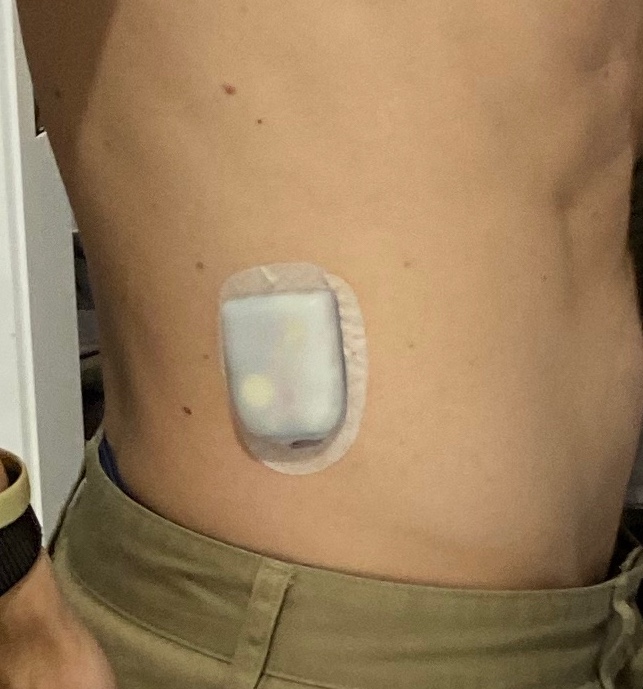
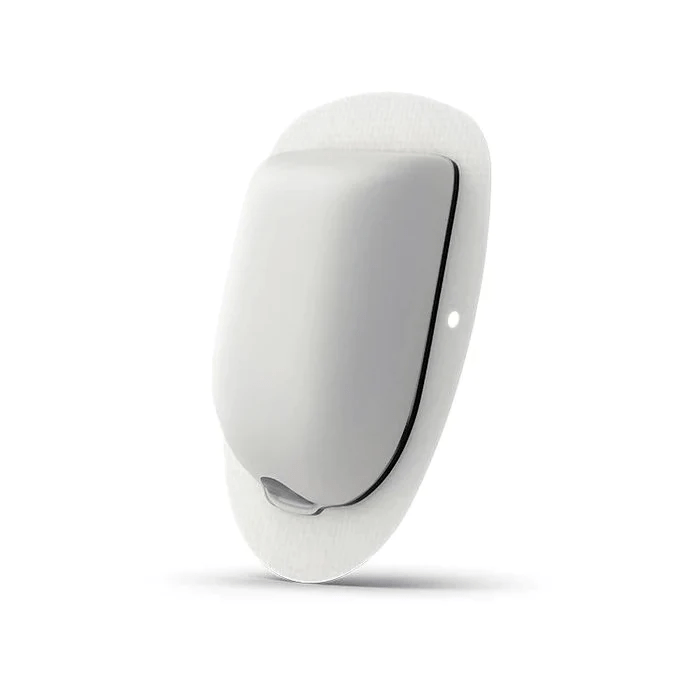
The pump system operates much the same as any other pump system available, with the main difference being that the pump and cannula are all part of the same physical unit. This is a huge advantage for sports, but can be noticeable while changing clothes, going to the toilet or during sexy time. The unit is so small its presence is barely noticeable.
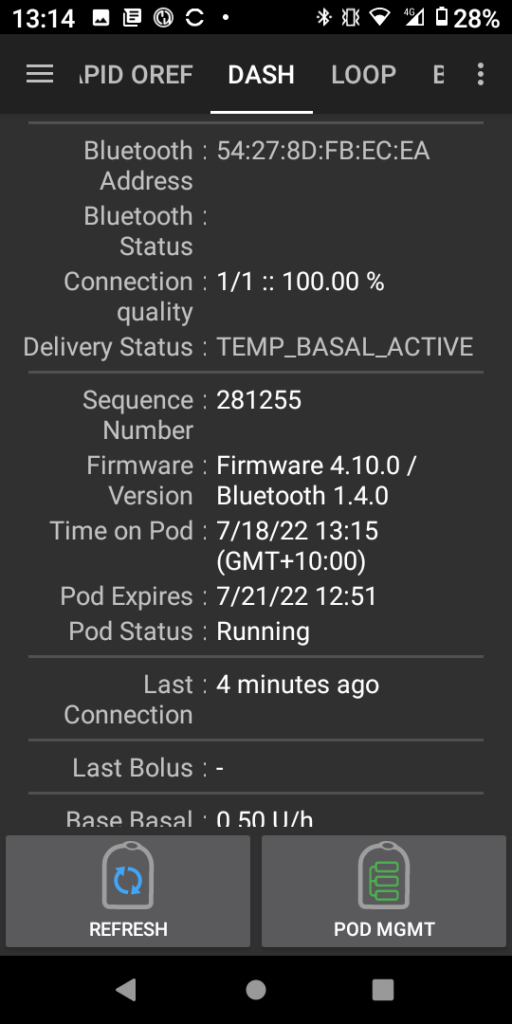
Omnipod Dash.

Sugar Management stats (So far)

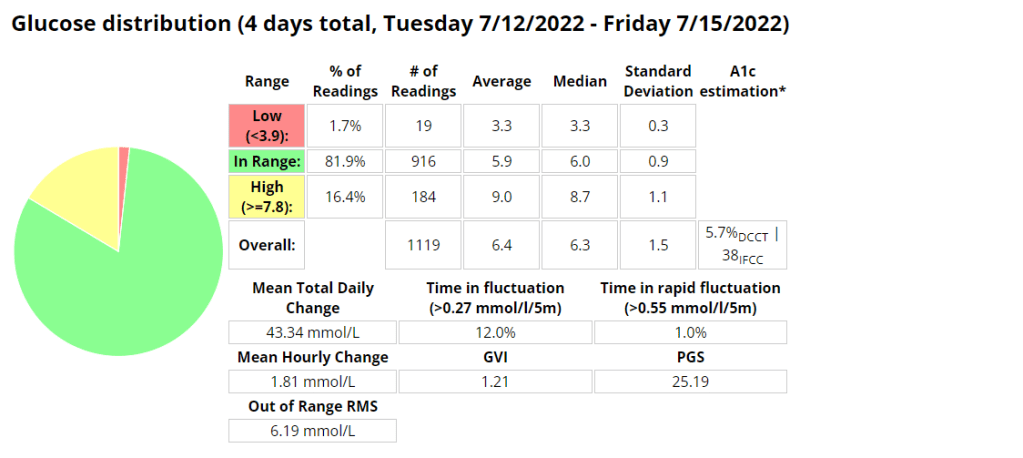
I am very pleased (and surprised to be honest) that I am using 28% less insulin on the Pods with improved (+9.3%) blood sugar control (Time in Range 3.9-7.8 mmol/l). I noticed far fewer super micro boluses (SMBs) being administered than before, but maybe that is due to me letting AAPS do more of the work in managing my sugars through unannounced meals (UAM).

Management Stats from Nightscout for the duration of the experiment so far. TIR = 3.9-7.8 mmol/l
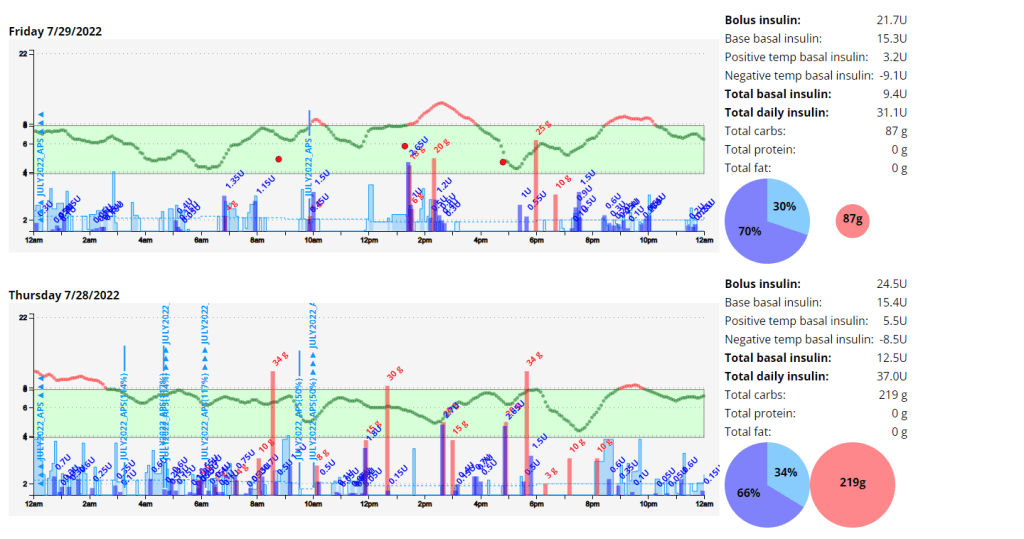
Total daily dose (TDD) and carbs average for the duration of the experiment.

Note: I am not adding in all the carbs I am eating as I am using announced meals in AAPS.

The Ambulatory Glucose Profile (AGP) enables retrospective analysis of dense data, trends and
patterns for the duration of the experiment.
Management Stats from Nightscout for the week prior to the experiment so far. TIR = 3.9-7.8 mmol/l
Total daily dose (TDD) and carbs average for the week prior to the experiment.
The Ambulatory Glucose Profile (AGP) enables retrospective analysis of dense data, trends and
patterns for the week prior to the experiment.
Management Stats from Nightscout for the duration of the experiment so far. TIR = 3.9-10 mmol/l
Screenshot from AAPS highlighting the SMB’s.

Android APS Setup

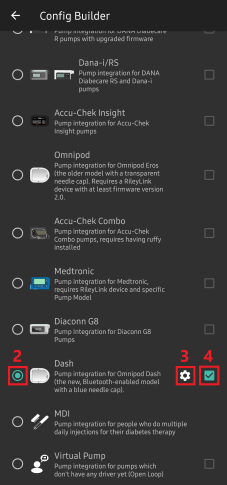
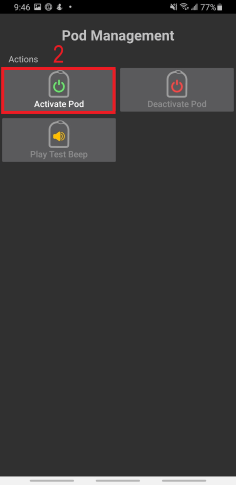
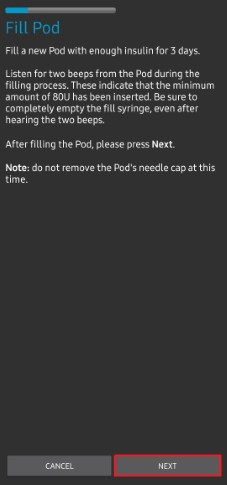
Setup of the Pod system in Android APS (AAPS) Boost Master 3.6.4 was surprisingly easy and intuitive. I just followed the Prompts after going to the configuration builder and selecting Dash as the pump.Its a very similar process for Eros pods, with the added requirement to pair the OrangeLink / RileyLink device.
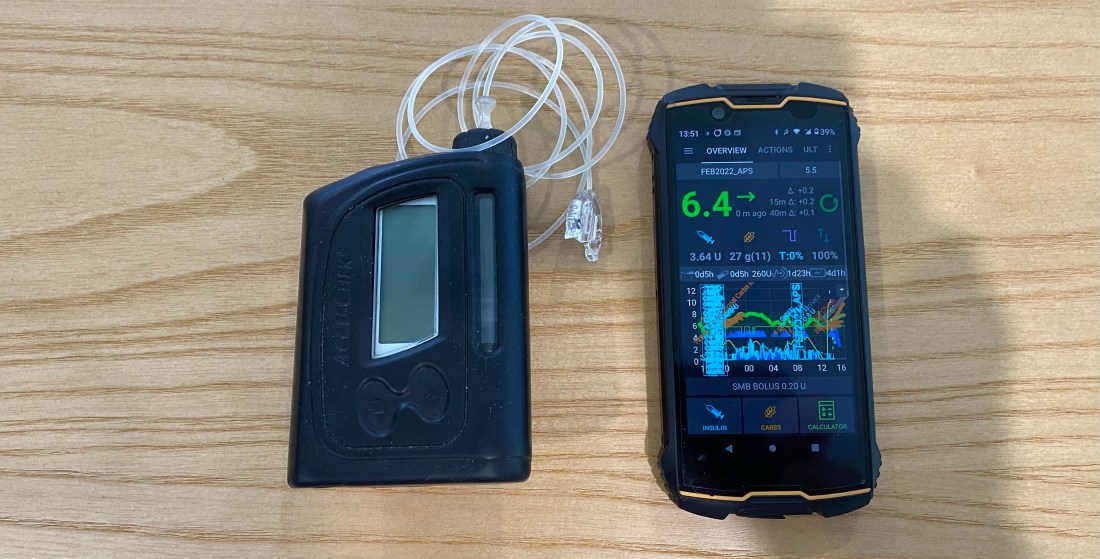
Setup Instructions

Installed Pod

Installed Pod
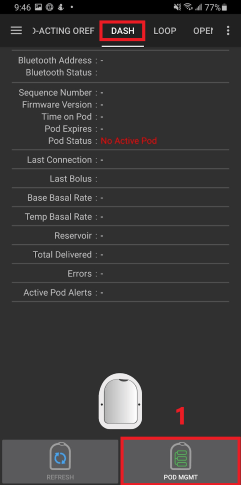
Dash page within AAPS
Dash page within AAPS.

Errors

I had an error starting the pod, but after hitting retry multiple times the pod activated and all was working as expected

Exercise

Exercise has been a lot more enjoyable without all the wires and having to worry about pump placement or damage. If I mountain bike and fall off (which happens every now and again) I lose one pod, and not an entire pump. Having more pocket space and less to carry is an added benefit.

Whats next?

I plan to test the pod while resistance training, mountain biking, running and the most intense sport I play, wrangling my two year old. If she cant destroy them, they are indestructible 🙂

Android APS – Adjusting Boost after testing AIMI

An interesting set of results from my time with Boost. I cant wait to return to AIMI with what I have learned.

I was eating slightly less carbs (118g vs. 136g) than when I was using AIMI, but I would expect that if your profile is setup correctly that the amount of carbs shouldn’t have much of an impact on performance metrics. I was running into a few hypos so I lowered the algorithms insulin required percentage (70% vs. 100%) which resulted in a whopping 1.6% decrease (57 minutes vs. (288 minutes / 4.8 hours)) of time spent in a hypoglycaemic state while using Boost.

My standard deviation was slightly lower (1.3 vs. 1.4) signifying less fluctuations between readings while my time in a hyperglycaemic state went up 0.6% (25.2 hours vs. 26.6 hours)).

I did have to turn off “enable boost percentage scale” as this was providing too much insulin, but more experimenting could remedy this.

Another interesting observation was that my ratio between total daily dose (TDD) and total carbs eaten went down from 4.2 to 4.01 (grams of carbs per unit of insulin) as my average blood sugar lowered.

My exercise seems to have stayed pretty consistent during testing (as per the table below) which leads me to believe the reduced insulin need may be related to requiring less insulin when blood sugar is euglycemic. Its going to be a little more difficult to track that for the next few weeks as I am preparing to ramp up training for the Southern Cross 10km in July. The training has however provided an opportunity to fine tune my running routine as outlined here in my post about predicting blood sugars while running.

I cant wait to do some further testing with AIMI, Boost and Eating now.

Table of performance metrics from when I was MDI to the latest build of Boost.
Boost Stats (70% insulin required)
AIMI Stats (100% insulin required)
Boost TIR stats 3.9 – 10mmol/l
Exercise table (stats derived from Strava and Python scripts)

Predicting blood sugars while exercising.

I recently posted about how my experimenting with running using AAPS was progressing. I observed that under certain conditions there was a significant lag between the capillary blood and CGM readings at about the 30 minute mark. This sparked some interest in wanting to know if I could predict what my capillary blood sugar could be using machine learning. I’m still not sure if its entirely possible yet, but I am having fun trying, and I have learned a lot in the process. I’m currently working on the script that will allow me to overlay a lot more AAPS data during a workout, including predictions.

I am getting a lot better at managing blood sugars as I noticed the last 14 exercises I was in range (3.9-7.8) 100% of the time.

Python script data capture

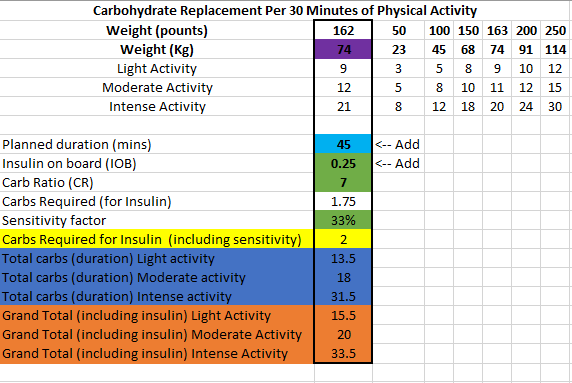
I have changed my approach slightly towards eating before exercise and have piggy backed off some research done by Gary Scheiner to create a spreadsheet that estimates the carbs required and effort for a run.

https://wordpress.com/post/t1daaps.wordpress.com/482

Dynamic Insulin Sensitivity Factor (ISF)

Dynamic ISF is all the buzz in the diabetic community at the moment, and so it should be! In the first few days of using it I was able to see marked improvements with little to no intervention as the algorithm scaled my correction doses.

What is Dynamic ISF

Your insulin sensitivity factor (ISF) is how much one unit of insulin will lower your blood glucose. Simply put dynamic ISF uses your total daily dose (TDD) of insulin to scale this value depending on blood sugar.

My results

So far the results have been astoundingly positive.

Before D-ISF : Average TDD: 30.1, Average Carbs :138g
Using D-ISF: Average TDD: 25.1, Average Carbs :102g

Update:

Using D-ISF for one (1) month. A little bit of an unfair test as I had 3 sensors fail during this period, which resulted in many issues with sensor accuracy.

Formula

ISF = 277700 / ( BG * TDD )

Differences in the GUI (when using DEV)

As you can see in the picture below, the yellow square highlights the time the loop last ran, and the red square shows the profile ISF vs. the calculated dynamic ISF.

Home screen of AAPS

It’s interesting to note that the D-ISF code isn’t implemented when using the calculator, its only actively scaling ISF using SMB’s (and maybe basal %). This will mean your normal profile ISF is going to be used when eating a meal. If you have never tested your ISF It may be worth while checking what the scaled ISF is at meal time (provided your BG is perfect) and setting your profile to that value if the values are vastly different. This is also providing that you aren’t in a period of significant resistance or sensitivity.

The Dynamic ISF plugin you will obtain in the config builder of the Dev code.

Where do I get a copy of the AAPS Dynamic ISF branch

It is in the same repository as the standard (master) version of AAPS. In order to use it you will need to select a different branch of AAPS (dev) and build that branch. I suggest you read Tim Streets repo notes for a more in depth description of the code and its functionality, even though you will not require the code from that repository. You will need to enable engineering mode on the phone in order to utilise the dev branch.

https://github.com/nightscout/AndroidAPS

I’ll write a post about building in the next few days.

Ciao for now!

AAPS – Run Testing 2022

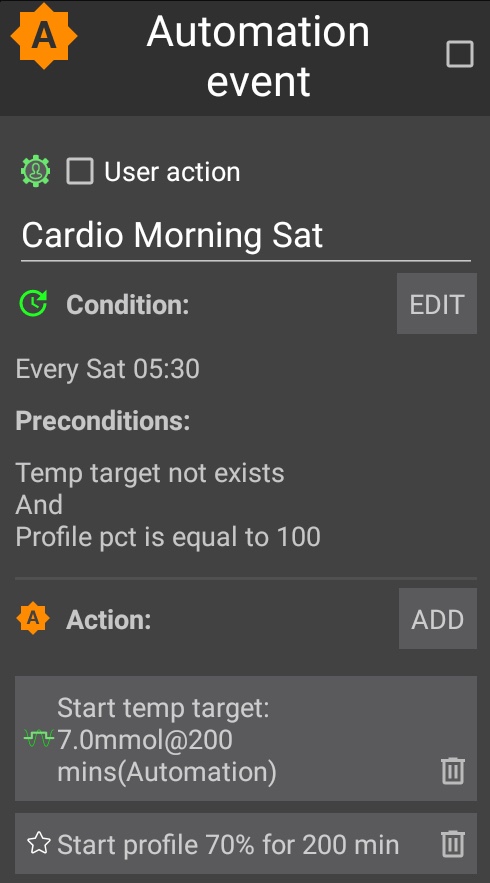
I decided to try using an automation to lower insulin levels and raise my glucose target before doing cardio. This allows AAPS to start this process at 05:30am on my days of choice so that my body is ready to exercise safely and with less need to consume carbohydrates. In my limited testing the process is working well, with some slight tweaking for testing parameters needed. NOTE: I only added half the amount of carbs I consumed to the APS for tracking. This is to avoid overcorrecting by the algorithm.

Expectations

I am trying to find the ideal conditions to exercise where I can experience moderate blood glucose fluctuations and not be required to consume large amounts of carbohydrates to keep me exercising safely. In the past on MDI I used to exercise fasted with only basal on board, which allowed me to stay in range for about 40 minutes before needing carbs. I am hoping to achieve this same amount using a pump. In past experiments I was able to achieve similar results during exercise by significantly reducing basal rates but I found that post exercise I struggled with higher than usual blood glucose readings for a few hours due to lack of insulin in my body.

Automations

Blood Glucose vs. CGM

The CGM results differed during exercise an average of 25% from blood readings. This made me decide to start some research of my own into using machine learning to try and estimate my blood glucose during exercise.

Results / observations

The automation route works well if you plan your exercise far enough ahead. The next experiment I will drop the profile percentage to 60% and observe. I noted an average of about 25% difference between the results the CGM and the finger pick tests. I was however able to keep my readings in range 100% of the time using 34g of carbs for the duration of the 50 minute experiment.

Capture from Nightscout

Video

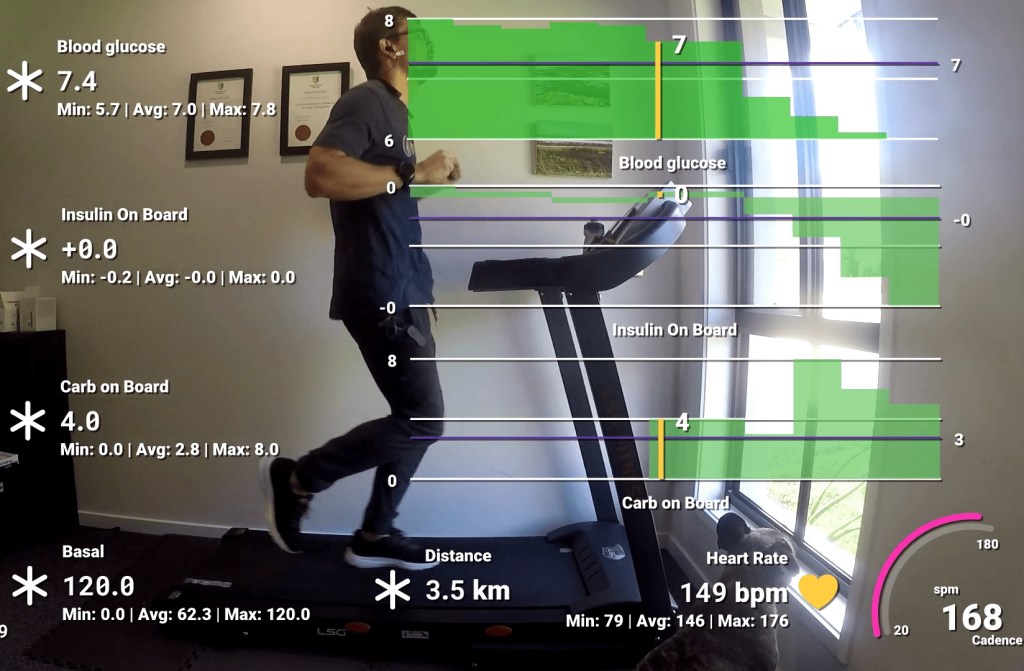
I created a video using data from my Garmin Forerunner 245 and AAPS to track the experiment. In this video I track blood glucose, insulin, carbs, basal, distance, heart rate and cadence. I noted that the algorithm the Garmin uses to determine distance does not work well while walking and didn’t register any distance until I started lightly jogging.

Capture from my GoPro during exercise