My Year with Omnipod: A Bitter-Sweet Journey

My Year with Omnipod: A Bitter-Sweet Journey

It’s been just over a year since I permanently switched to the Omnipod, and my experience has been a blend of highs and lows. Despite a slight increase in my A1C from 5.7% to 6%, in part due to increased carbohydrate consumption, I appreciate the benefits of the Omnipod’s tubeless design. Not having to deal with tubes and the convenience of the Omnipod’s form factor have made managing my diabetes a bit less intrusive.

However, the transition hasn’t been without challenges. The Omnipod system requires immediate activation upon insertion, which can cause insulin resistance due to the initial trauma of insertion. Its design also means that you experience any issues with insulin resistance or site trauma and need to change a pump early, it can be a costly endeavour. This resistance is difficult to manage, especially around meal times when precise insulin delivery is crucial.

Another problem I encountered was tunnelling, where insulin leaks out from the cannula site. This not only affects insulin delivery but can also cause irritation. The excipient nicotinamide in the insulin formulation has also caused some site reactions for me so I mix insulin with a 50-50 ratio with Humalog. Please note this is off label.

Tips and Tricks I’ve Learned

Despite these challenges, I’ve discovered several strategies to improve my experience with the Omnipod:

  1. Adjusting Insulin Profiles:
    • When installing a new pump, I set my profile to 120% to counteract any initial insulin resistance.
    • I try to install the pump a few hours before or after a meal to avoid the insulin resistance coinciding with a meal.
    • If I miscalculate the timing and need to change a pump around meal times, a short 5-10 minute walk on the treadmill helps improve insulin absorption.
  2. Securing the Cannula:
    • Using Opsite Flexifix under the pump has been a game-changer. It keeps the cannula in place and reduces the need to replace the pump after activities like running.
    • For additional security, I use Smith+Nephew Primaflex Plus or Fixomull stretch over the pump. I use an old pump or the over-tape provided by Dexcom as a template to cut pieces as needed.

These tips have significantly improved my experience with the Omnipod, making blood sugar management more consistent and reducing the frequency of pump replacements due to physical activity.

Interesting Facts and Supporting Information

  • A1C and Diabetes Management: An A1C level of 6% is considered good diabetes control. According to the American Diabetes Association, an A1C below 7% is recommended for most adults with diabetes .
  • Insulin Absorption: The angle and method of insulin delivery can impact absorption. Studies have shown that the angle of insertion can affect how well insulin is absorbed, with certain angles potentially causing more issues like tunneling .
  • Use of Adhesives: Using adhesives like Opsite Flexifix can help secure insulin pumps, reducing the risk of dislodgement and improving insulin delivery reliability .

In conclusion, while my journey with the Omnipod has had its ups and downs, the freedom from tubes and the ability to manage my diabetes with less visible technology are significant benefits. With the right strategies, I’ve been able to mitigate some of the challenges and maintain effective blood sugar control.


Featured

Gold Coast Half Marathon

Race Day

Introduction:

The Dawn Effect and Blood Glucose: When we wake up in the morning, our body experiences a surge of hormones, commonly referred to as the “dawn effect” or “dawn phenomenon.” This natural hormonal response can lead to an increase in blood glucose levels even before we consume any food or engage in physical activity. Cortisol, growth hormone, and other hormones play a role in this phenomenon. For individuals with diabetes, the dawn effect can pose challenges in maintaining stable blood glucose levels, especially during a race. The hormonal surge may contribute to higher blood sugar levels, making it crucial to adjust your diabetes management routine accordingly.

This graph shows the average blood sugar during training vs. my blood sugar from the Gold Coast Half Marathon.
Training vs. RaceAverage distance (km)Average time (min)Average HR (bpm)TIR (3.9 – 7.8)Average Blood Glucose (mmol/l)Coefficient of variation (%)Pace
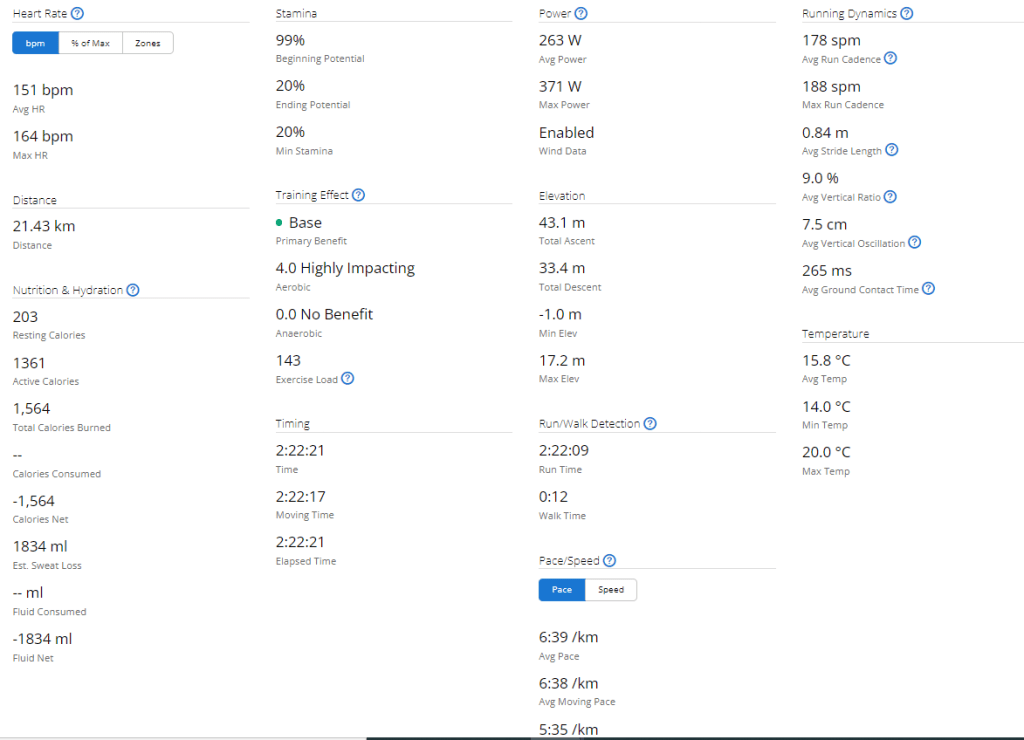
Training 149215692%5.8146:40
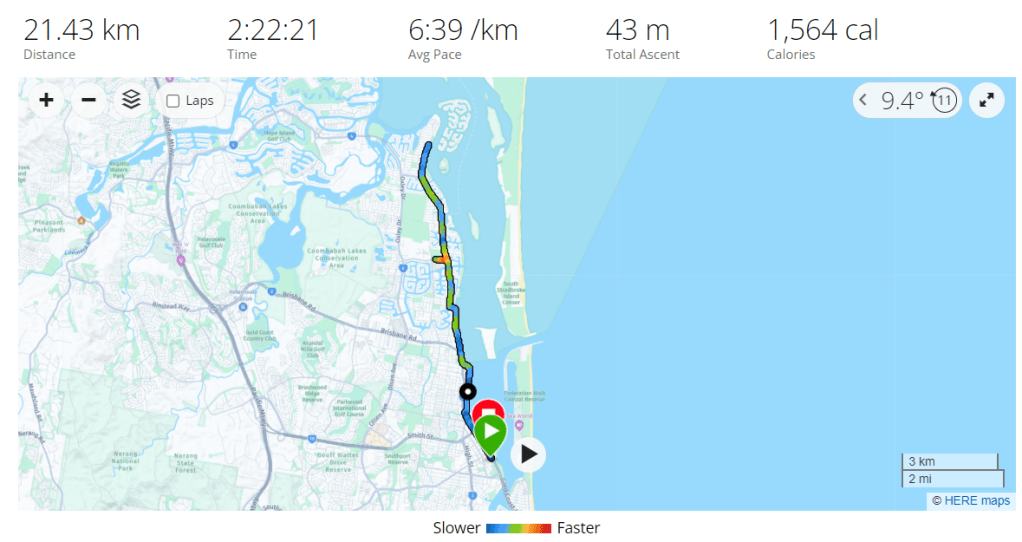
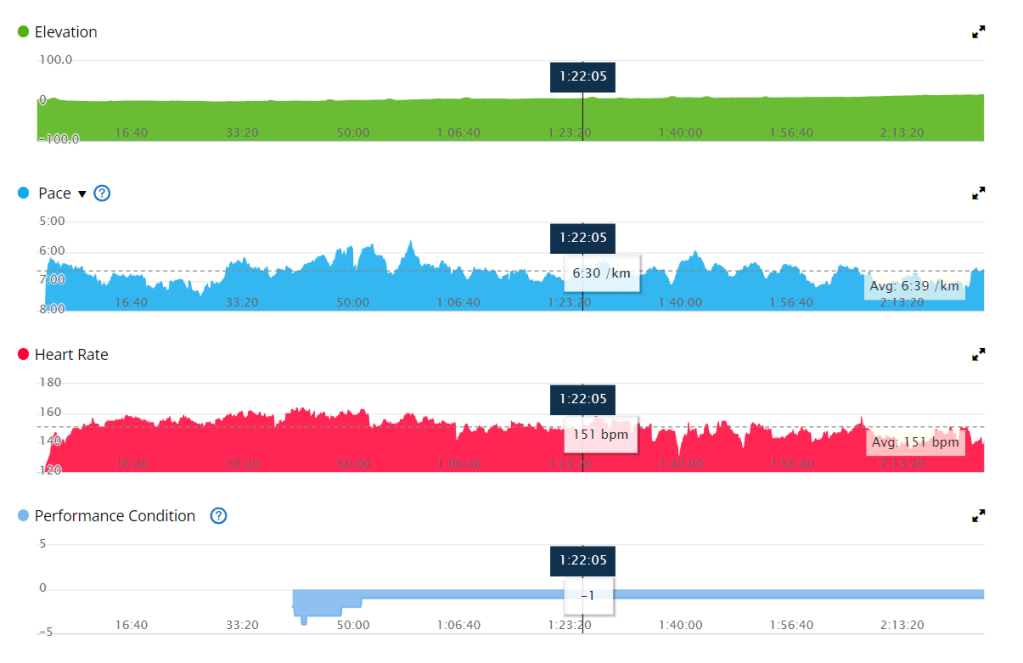
Race21.414015121.4%9.922.546:39
This table shows the average metrics during training vs. the same metrics during the Gold Coast Half Marathon.

Blood Glucose Management: Pre-Race Strategies: To optimize your blood glucose levels during a race, careful planning and preparation are key.

Here are some strategies to consider:

  1. Race Day Automation: If you use an insulin pump or automated insulin delivery system, consider setting up a race day automation plan. Gradually reducing your insulin on board (IOB) and raising your blood sugar target before the race can help mitigate the impact of the dawn effect.

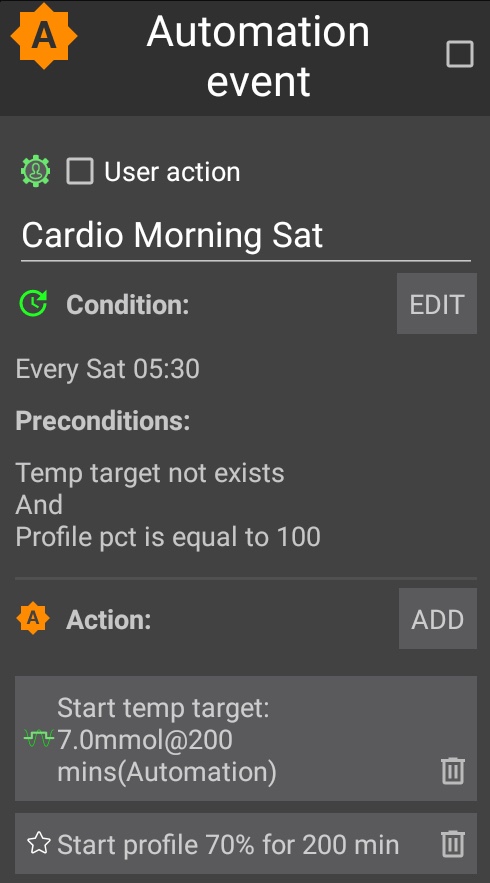
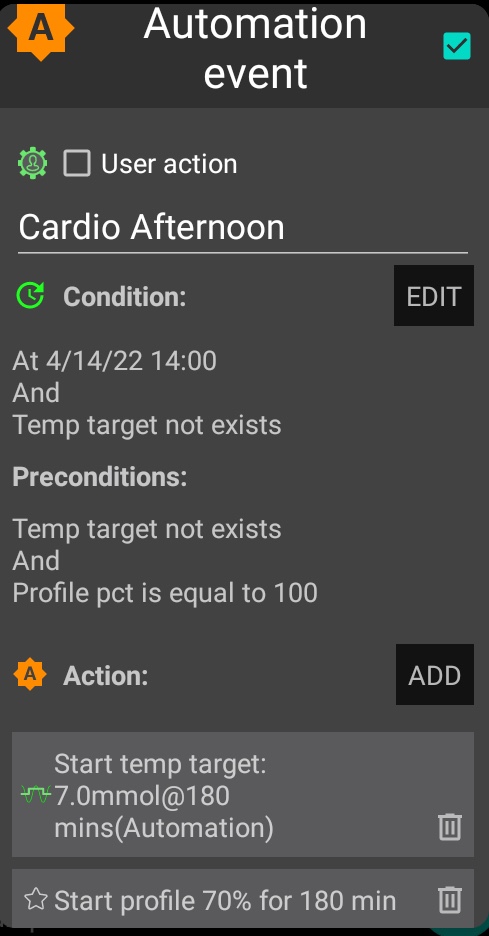
The automation I use if I plan on exercising at 06:30am. I use 05:00 – 06:00 so that if another automation is active at 05:00am there is opportunity for this automation to run after that one completes.
  1. Timing of Pre-Exercise Snacks: To align the digestion of carbohydrates with the energy demands of the race, it is important to time your pre-race snack appropriately. If your blood glucose is around 5 mmol/l before starting, consuming a carbohydrate-rich snack approximately 15 minutes before the race can help maintain stable blood glucose levels, in my experience cliff bars have the perfect amount of nutrients for a long run.
  1. Managing Blood Glucose During the Race: Once the race begins, various factors can influence your blood glucose levels.
  1. Here are some considerations to keep in mind:

    Listen to Your Body: Pay attention to any signs or symptoms that may indicate fluctuations in your blood glucose levels during the race. Feeling lightheaded, fatigued, or experiencing unusual thirst may indicate the need for carbohydrates. Regular Blood Glucose Monitoring: Carry a portable blood glucose meter to monitor your levels throughout the race. This will enable you to make timely adjustments and take appropriate remedial actions when necessary. Carbohydrate Consumption: Plan to consume carbohydrates during the race to maintain your blood glucose within a desirable range. Experiment with different forms of carbohydrates, such as gels, sports drinks, or energy bars, to find what works best for you. Remember to consider the impact of any exercise-induced insulin sensitivity and adjust your carbohydrate intake accordingly.

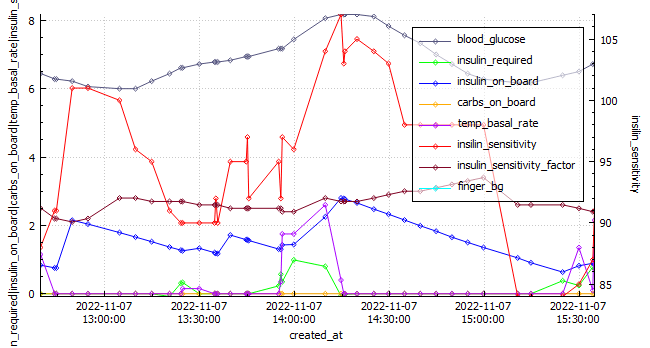
Data Extract from AAPS.

Post-Race Recovery: Upon crossing the finish line, it’s essential to prioritize your recovery and address any pain or discomfort that may have emerged during the race. Be mindful of the following:

  1. Musculoskeletal Discomfort: Races can place significant stress on your body. Pay attention to any pain or discomfort in your muscles, joints, or tendons. Consult with a healthcare professional if necessary to address any post-race injuries. Blood Glucose Check: After the race, continue monitoring your blood glucose levels as they may fluctuate due to post-exercise hormonal responses. Adjust your post-race nutrition and insulin dosages accordingly.

Conclusion: Participating in a race as a person with diabetes requires careful consideration of blood glucose management strategies. Understanding the impact of waking up on hormonal levels, adjusting your approach accordingly, and incorporating remedial actions during the race are crucial steps towards maintaining stable blood glucose levels. By staying vigilant, prepared, and responsive to your body’s needs, you can conquer the challenges of a race while managing your diabetes effectively.

References:

  • American Diabetes Association. (2021). Diabetes and Exercise. Retrieved from https://www.diabetes.org/healthy-living/fitness/exercise-and-type-1-diabetesGupta, L., Khandelwal, D., Singla, R., Gupta, P., Kalra, S., & Dutta, D. (2017). Dawn Phenomenon and Its Impact on Blood Glucose Control. Indian Journal of Endocrinology and Metabolism, 21(6), 901–909. doi: 10.4103/ijem.IJEM_284_17

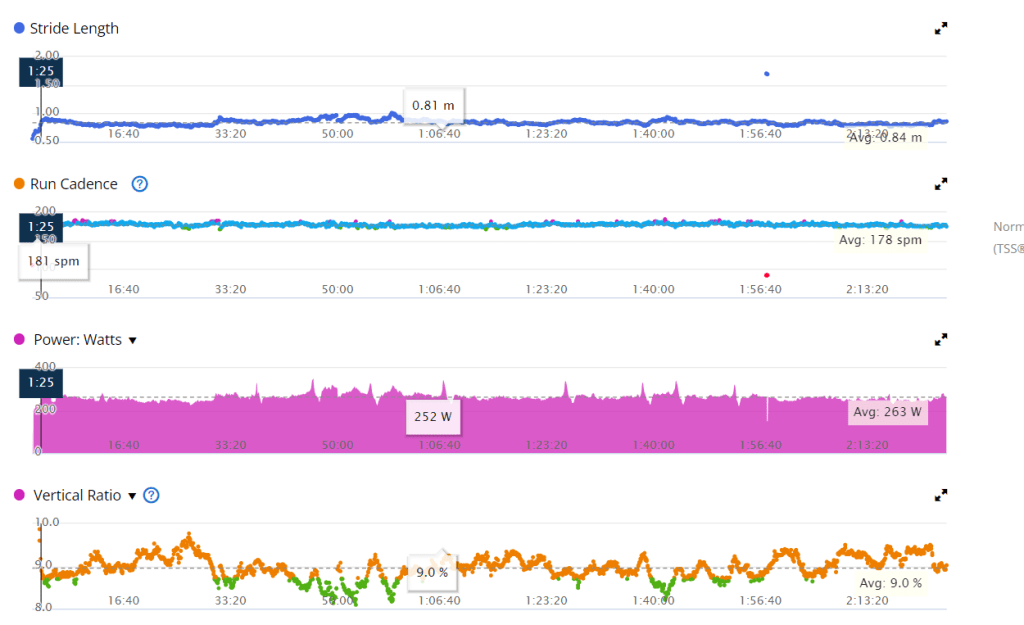
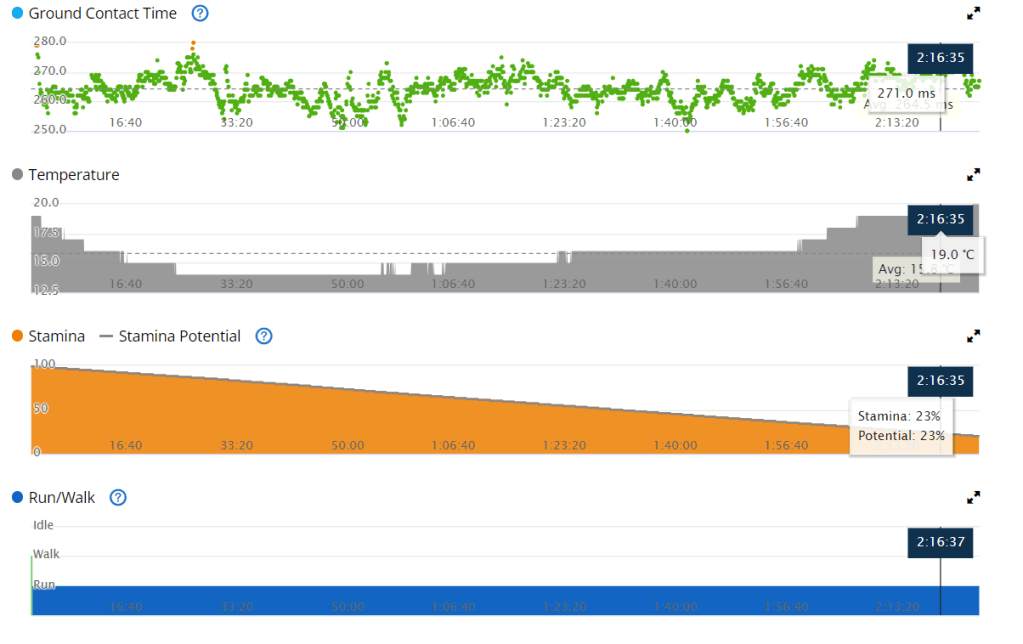
Exercise stats from Garmin

Equipment

Equipment NameNote
Osprey duro 6 – Hydration packThis hydration pack is a great option for long runs or cycles. It holds 1.5 liters of water, which is more than enough for most people to drink on a 2+ hour activity. It also has multiple pockets at the front of the vest, which allow you to store food, your phone, and your blood glucose meter. This makes it easy to access your essential items while you’re running or cycling.
Glucose gelsMy general rule of thumb is bring at least twice the amount you expect you will need.
Cliff barThe cliff bar was a new addition to my nutrition. These bars seemed to work well to stabilise blood glucose and I required no additional carbs for most runs between 14-18km.
Blood glucose meter + extra stripsIf my sensor were to fail or I was to become dehydrated enough that my CGM reading was inaccurate I wanted to be able to assess my blood glucose.
DexcomContinuous glucose monitor. I ensured this had at least 24 hours to settle before the race. This way readings would more accurate.
Android APS phone The phone that contain my artificial pancreas system.
Onmipod DashBluetooth enabled insulin pump, allowing me to use Android APS. I ensured that I inserted the pod at least a day before the race so I had enough time to identify issues.
Brooks Ghost shoesA comfortable pair of shoes you have tested and run in prior to the race. I still developed blisters so its imperative you get the correct size.
Asics running socksA comfortable pair of socks.
HatA hat to ensure I don’t burn.
earbudsTo enjoy some music while I run.

Training

To prepare for the Gold Coast Marathon I did the following exercise;

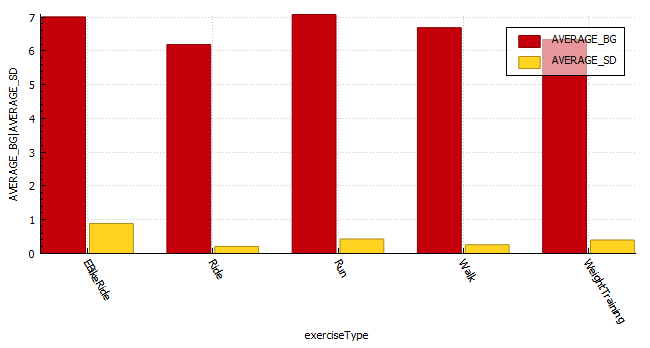
Exerciser TypeCountDistanceHourAverage heart ratecoefficient of variation (%)Average blood glucoseAverage time in range
Run4127630150 bpm | 2.6 z9.68 6.680%
WeightTraining105109 bpm6.2684%
EBikeRide81428134 bpm156.873%

Featured

Diabetes awareness month and Android APS

14/11/2022

Introduction

It’s diabetes awareness month and so I wanted to talk to you about something I am very passionate about, Android artificial pancreas system (AAPS). It’s not the cure I wanted but as far as I am concerned, it’s the closest to normal I have felt in the 25 years I have been a diabetic.

Why I LOVE Android APS

I decided to try Android APS just prior to the birth of my daughter. At the time I was using multiple daily injections (MDI) on a low-carb diet (less than 45g per day excluding protein and fat) and trying to pick up some muscle. I found it rather challenging to eat the number of carbs the trainer suggested without compromising control. I was also anticipating the late nights having a baby entails and I wanted to be prepared. David Burren’s blog provided a blueprint of what could be expected if I committed to investing the time required to perform all necessary testing and fine-tuning.

Benefits of Android APS

  • Meal management
    • Meals can be managed through a number of mechanisms including;
      • Un-announced meals (UAM) – AAPS boluses insulin without intervention or carb entry.
      • Announcing carbs – Add the carbs into the system and the calculator estimates the amount of insulin required based on your COB, IOB, ISF, current blood glucose, blood glucose deltas, and insulin sensitivity.
      • Extended carbs – typically used to mimic the absorption of protein (gluconeogenesis) or delayed gastric emptying caused by high-fat meals.
  • Exercise management
    • Insulin scaling adjusts basal insulin based on current insulin sensitivity
    • Automations allow you to schedule profile changes and temporary blood sugar targets for the duration of activity or condition.
  • Hardware / pumps / wearables
    • Functional on many old and new low-cost Android phones
    • Directly or indirectly (via Nightscout) display various blood glucose-related data on compatible watches. If you are using an Android watch (WearOS) you can control AAPS via the watch. Garmin watches can display blood glucose data during an activity.
    • Control a wide variety of pumps
    • Utilise the blood glucose data from a wide variety of CGMs (continuous glucose monitors)
  • Software
    • Automations allow you to automate system actions based on conditions (eg. blood glucose increasing, blood glucose decreasing, leaving for work, pump disconnect) or schedules.
    • SMS Commands to control AAPS remotely
    • Super micro boluses / boli (SMBs) allow AAPS to provide insulin efficiently and effectively.
    • The system will suspend insulin delivery when blood sugar is predicted to go below a certain threshold.
    • Highly customizable to your unique needs, with certain advanced builds allowing you to control more system variables (Boost, AIMI, Eating Now).
    • Cutting-edge development
      • Dynamic insulin sensitivity factor (ISF that changes based on blood glucose)
      • Improved prediction models
      • Improved insulin modeling (9-hour DIA)
  • Quality of Life
    • Reduced diabetic burden and stress.
    • Glucose is constantly monitored, with the ability for someone to follow you remotely, including community members. This can assist with fine-tuning settings.
    • Ability to eat more foods without compromising control
    • Improved glucose control reduces the possibility of long-term complications.
  • Safety
    • Objectives provide a level of safety as users need to understand basic principles of how to use the APS prior to closing the loop.
  • Cost
    • AAPS is open-source and free to use.
  • Monitoring / Reporting

Dis-benefits of Android APS

  • DIY Software build
    • As with all DIY systems, you are required to build the application prior to using it.
  • Cost of hardware
    • Phone
    • CGM
    • Pump and supplies
  • Connectivity fatigue
    • The burden of being connected to technology 24/7
  • Reliance
    • It is easy to become reliant on AAPS managing blood sugars.
  • Usability
    • Due to its complexity, you are required to invest a large amount of time in order to gain the understanding and skills required to configure and utilise it correctly.

Statistics and examples:

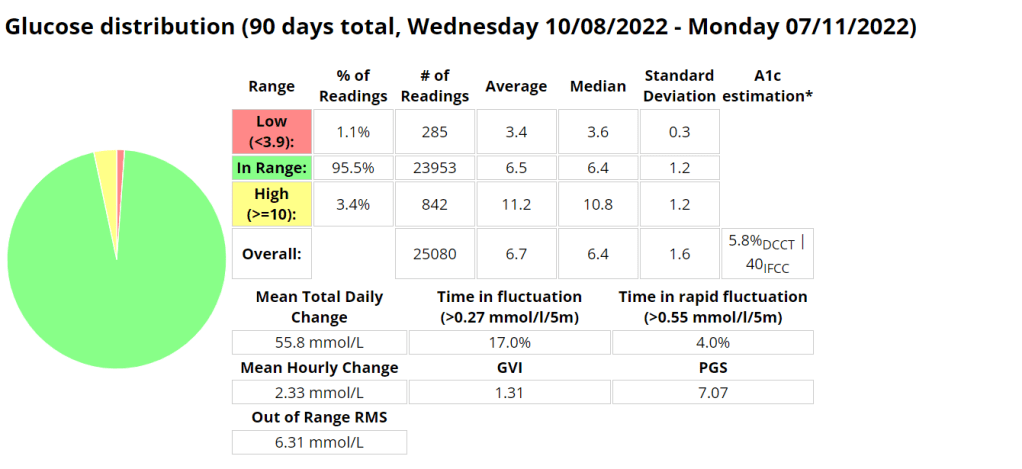
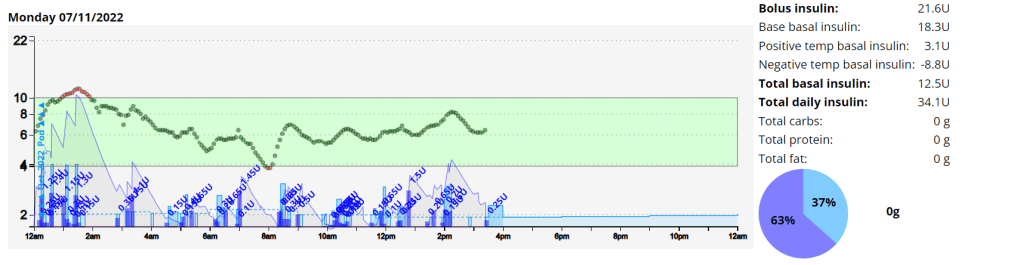
Nightscout statistics – 3 Months

Nightscout blood glucose distribution report
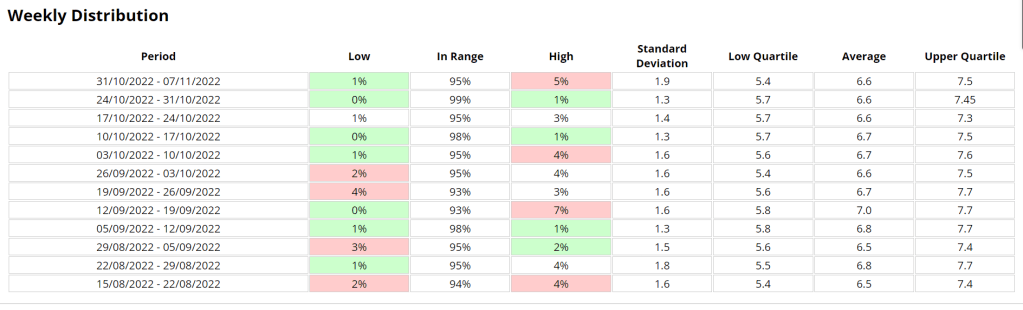
Nightscout blood glucose weekly distribution report

Control stats for different systems

Date Started TestControl Mechanisme-A1CAverage Blood GlucoseTime In Range (TIR) 3.9 – 10Standard DeviationAverage carbs consumedGVIPGSCGP – PGR
20/11/2019MDI6.1%7 mmol/l87%2.2 mmol/l1.220.331.7
20/11/2020MDI5.6%6.3 mmol/l94%1.7 mmol/l< 601.178.671.3
20/11/2021Loop5.7%6.5 mmol/l94%1.7 mmol/l<100 (carb counting)1.258.291.3
04/02/2022Android APS5.7%6.5 mmol/l96%1.5 mmol/l>200, little to no carb counting1.245.701.2
Analysis stats provided by Nightscout reporter.
Comprehensive glucose pentagon from Nightscout reporter report.

Un-announced meal (UAM) example

Low-carb meal with UAM running (Low-carb bread with cheese, ham, and mayo.)

Extract from Android APS data for a low carb meal

As can be seen above the system manages low-carb meals quite well with no carb inputs from the user. The system constantly monitors for rapid changes in blood sugars and administers insulin when required to quickly brings sugars into range.

Nightscout screenshot of low carb meal being absorbed while AAPS manages sugars.

Exercise stats / examples

YearAverage Time in Range (3.9-7.8 mmol/l)Average blood glucose (mmol/l)Average Standard Deviation (mmol/l)Total HoursTotal KM
202280.1 %6.60.43 131885
202171.9 %6.7 0.4149920
202069.7 %6.9 0.767658
Annual improvements are made through tweaking system variables and my approach to exercise.
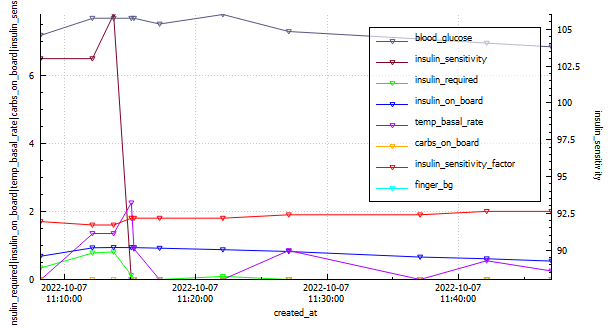
Weight Training
DateIOB @ startMoving timeExercise TypeAverage HR (bpm)Standard Deviation (mmol/l)CGM BG StartCGM BG EndCGM BG Average (mmol/l)TIR (3.9-10)
2022-10-070.1436.93WeightTraining101.10.3657.76.87.27100.0%
EBike Ride
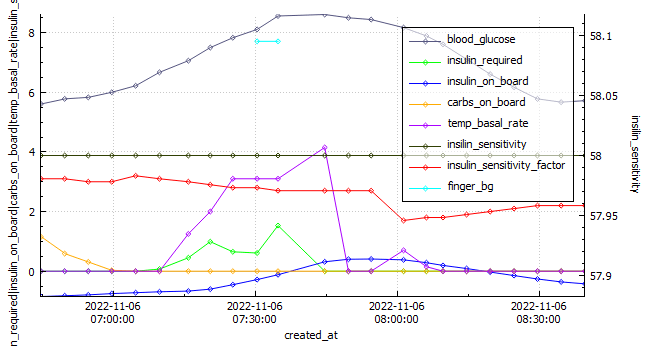
Android APS data exported during an E-Bike Ride 2022-11-06.
DateIOB @ startMoving timeExercise TypeDistance (km)Average HR (bpm)Standard Deviation (mmol\l)CGM BG StartCGM BG EndCGM BG Average (mmol\)TIR (3.9-10)
2022-11-06-0.849115.92eBikeRide271431.0955.95.87.16100%
Running
Android APS data exported during a run 2022-10-03.
DateIOB @ startMoving timeExercise TypeDistance (km)Average HR (bpm)Standard Deviation (mmol\l)CGM BG StartCGM BG EndCGM BG Average (mmol\)TIR (3.9-10)
2022-10-03-0.53478Run12 1681.1055.55.16.75100%

Omnipod Dash – Summary – Week 1&2

Its only been a week and already I feel so comforted by the barely audible click of the pump depressing the plunger in the mini pump at meal times or sporadically throughout the day. Its the sound of blood sugar control. What a week its been learning all I can about Pod changes and being woken up on day 3 by the Pod alarm alerting me its 8 hours before the Pod expires. Once expired it was interesting to note that the Pod functioned as per normal, apparently for another 8 hours.

I had a Pod on days 3 and 4 that was inserted into my leg that may have had a cannula issue, as I struggled to maintain my standard level of control.

Its been a lot easier to exercise focusing on enjoying the task rather than if I would break the pump or rip out a cannula. Having no wires makes it a lot easier to run or gym as I don’t have to worry about pump placement as much. Previously I needed to ensure I had pants with pockets or a belt clip available.

I have also found sleeping a little easier, as I can barely notice the pump If I roll over onto it.

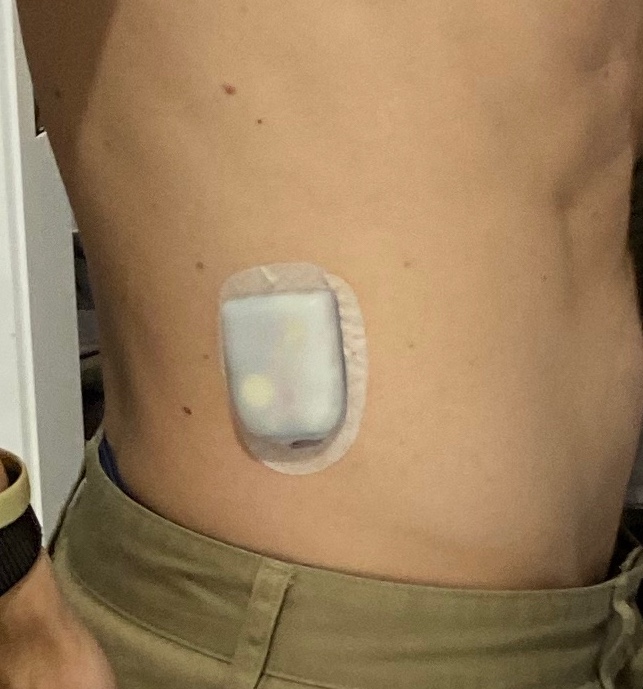
Flank insertion.
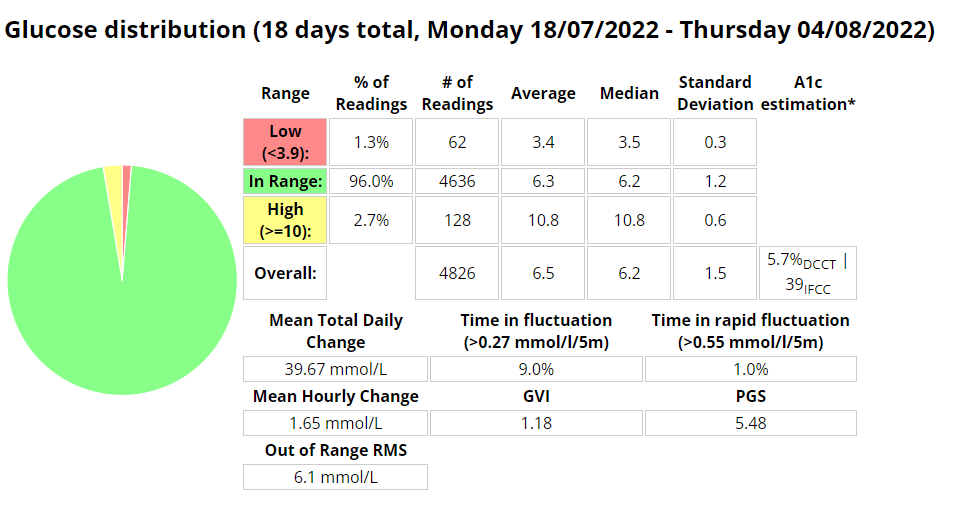
Boost Omnipod – Time in Range (3.9 -7.8 mmol/l)
Boost Omnipod – Time in Range (3.9 – 10 mmol/l)

Unannounced meals

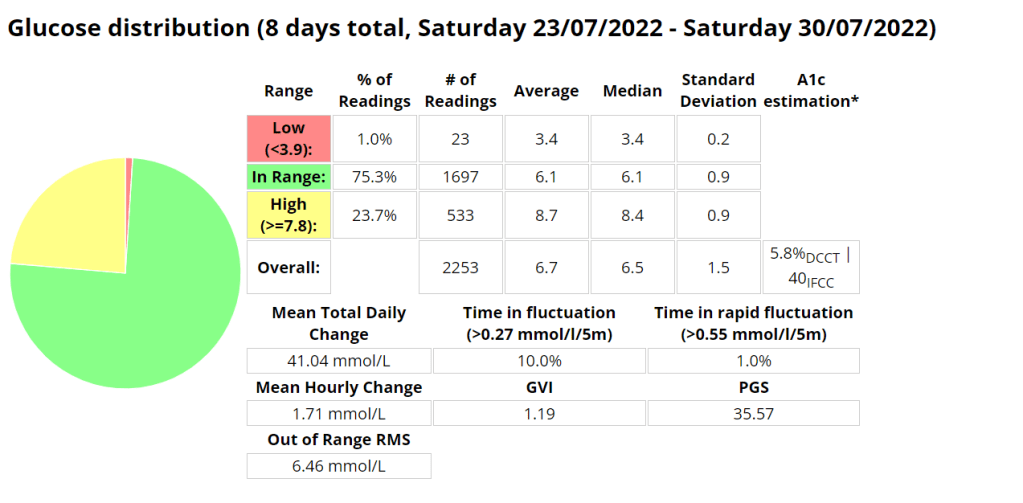
I decided to test the system with unannounced meals consisting of 40g of carbs or less. I am a bit of a control freak when it comes to diabetes so I have been postponing testing this for a long time. The results were outstanding. I will be writing more about this in the future, including any automations I use or test.

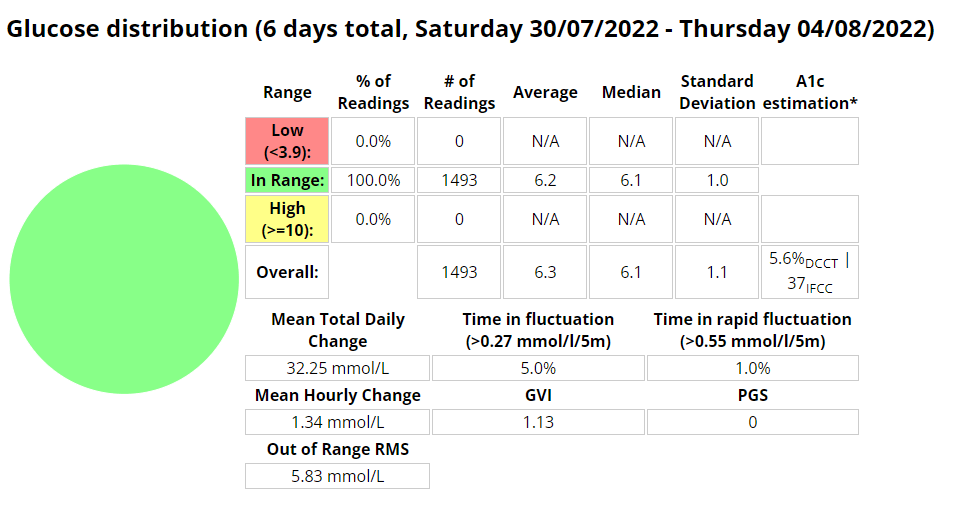
Boost Omnipod – UAM – Time in Range (3.9 -7.8 mmol/l)

Boost Omnipod – UAM – Time in Range (3.9 – 10 mmol/l)

Unannounced meals – Week 1

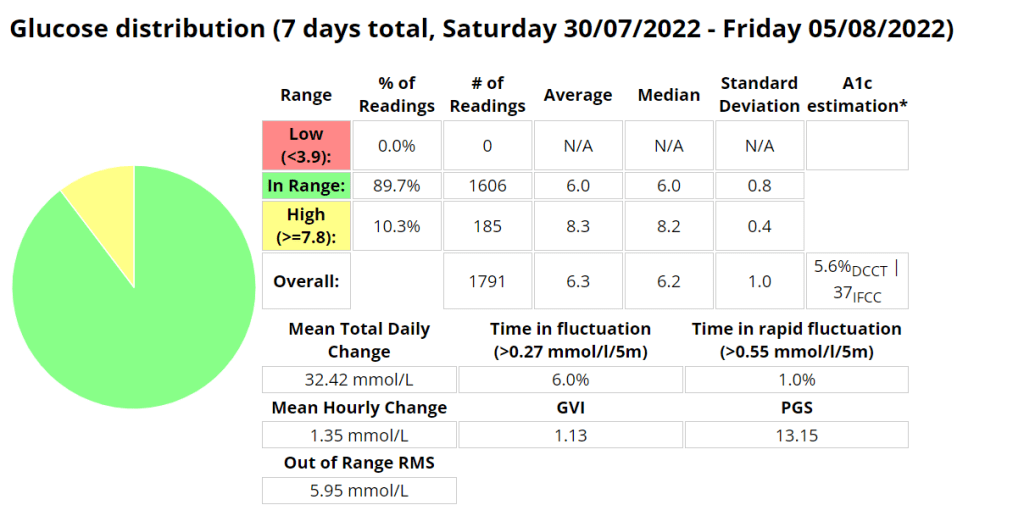
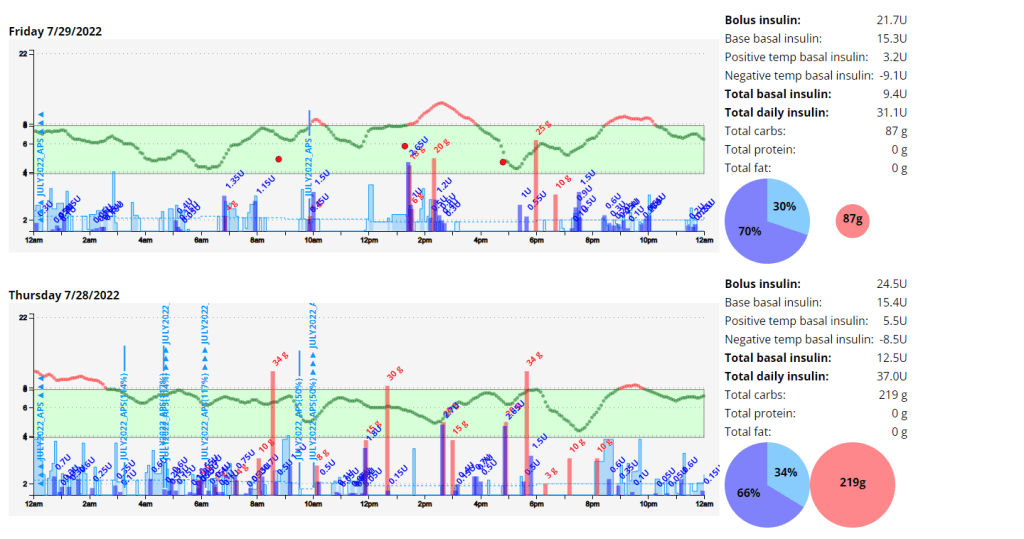
I started testing unannounced meals in Android APS on Saturday 30 July 2022. I am a bit of a control freak and really couldn’t believe that a system could manage my diabetes better than I could. I had more information available to me to make more informative decisions “I would tell myself”. But I seem to be wrong, well at least partly. I am using a branch of AAPS that delivers insulin early, but I found that managing protein and fat was more problematic than carbs seemed to be. Stubborn high blood sugar that seemed to take a few hours to correct. So I decided to do a little testing with automatons to try and improve those numbers.

Boost UAM stats (Time in range 3.9-7.8 mmol/l)
Boost UAM stats (Time in range 3.9-10 mmol/l)

Announcing carbs and pre-bolusing

Eerm…what? How is this possible? It seems with accurate carb counting I still cant account for digestion times as well as AAPS can.

Automations

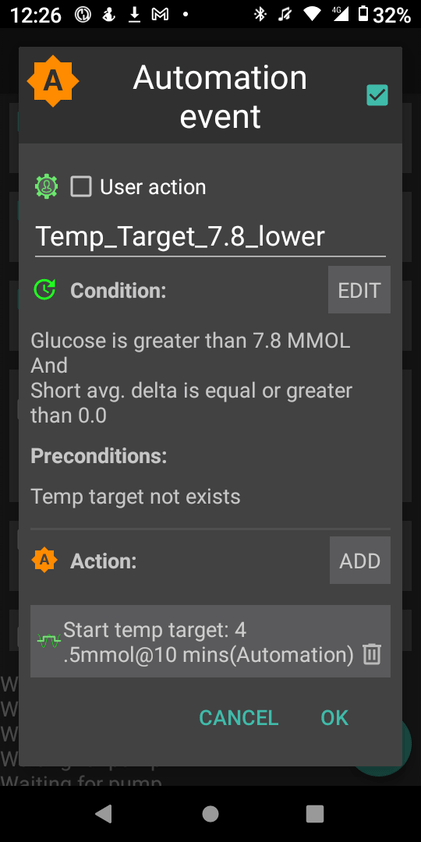
I use two (2) automations to try and manage my readings more closely. These automations are over and above the Boost logic that provides insulin earlier than the standard code.

The first automation simply sets a lower target when my reading is above 7.8 mmol/l AND not dropping. This allows AAPS to bring down my readings more quickly.

The second is to try and compensate for protein and fat in the low carb meals I eat. This automation will activate if

  • my reading is above 6.5 mmol/l AND
  • between meal times AND
  • my reading isn’t dropping AND
  • there is active resistance detected (not sure if this even matters)

My hypothesis is that the system can detect the resistance post the meal window but I need to test this assertion further.

AAPS – Run Testing 2022

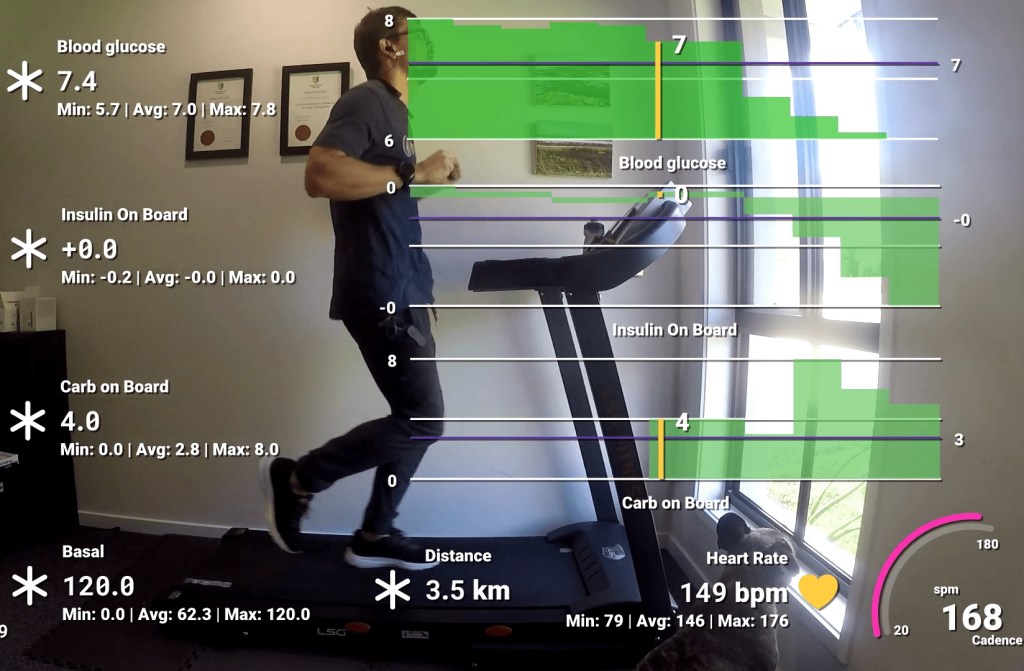
I decided to try using an automation to lower insulin levels and raise my glucose target before doing cardio. This allows AAPS to start this process at 05:30am on my days of choice so that my body is ready to exercise safely and with less need to consume carbohydrates. In my limited testing the process is working well, with some slight tweaking for testing parameters needed. NOTE: I only added half the amount of carbs I consumed to the APS for tracking. This is to avoid overcorrecting by the algorithm.

Expectations

I am trying to find the ideal conditions to exercise where I can experience moderate blood glucose fluctuations and not be required to consume large amounts of carbohydrates to keep me exercising safely. In the past on MDI I used to exercise fasted with only basal on board, which allowed me to stay in range for about 40 minutes before needing carbs. I am hoping to achieve this same amount using a pump. In past experiments I was able to achieve similar results during exercise by significantly reducing basal rates but I found that post exercise I struggled with higher than usual blood glucose readings for a few hours due to lack of insulin in my body.

Automations

Blood Glucose vs. CGM

The CGM results differed during exercise an average of 25% from blood readings. This made me decide to start some research of my own into using machine learning to try and estimate my blood glucose during exercise.

Results / observations

The automation route works well if you plan your exercise far enough ahead. The next experiment I will drop the profile percentage to 60% and observe. I noted an average of about 25% difference between the results the CGM and the finger pick tests. I was however able to keep my readings in range 100% of the time using 34g of carbs for the duration of the 50 minute experiment.

Capture from Nightscout

Video

I created a video using data from my Garmin Forerunner 245 and AAPS to track the experiment. In this video I track blood glucose, insulin, carbs, basal, distance, heart rate and cadence. I noted that the algorithm the Garmin uses to determine distance does not work well while walking and didn’t register any distance until I started lightly jogging.

Capture from my GoPro during exercise

Mountain biking with Android APS (AAPS)

Preparation

In preparation for my cycle I started an automation to prepare my body for the impending exercise. This automation reduces my basal insulin ( as well as scale the rest of my management metrics) by 30% and set a temporary target (TT) of 7mmol/l. AAPS will not allow me to automate a profile % shift of more than 30%, so I reduced the profile a further 5% manually in AAPS an hour before the ride.

Exercise Metrics:

Garmin exercise stats

Blood Glucose:

Interestingly, AAPS stopped basal for a long period and allowed the IOB to runs its course.

Python script data
Garmin Connect IQ graphs (xDrip+/Spike/Nightscout Datafield)
Garmin Connect IQ data (xDrip+/Spike/Nightscout Datafield)

Outcome:

My blood glucose held quite steady despite a mixture of anaerobic and aerobic levels of activity and so I didn’t need to consume any carbohydrates. Hopefully future attempts are as successful as this one.

Video: