Featured

Gold Coast Half Marathon

Race Day

Introduction:

The Dawn Effect and Blood Glucose: When we wake up in the morning, our body experiences a surge of hormones, commonly referred to as the “dawn effect” or “dawn phenomenon.” This natural hormonal response can lead to an increase in blood glucose levels even before we consume any food or engage in physical activity. Cortisol, growth hormone, and other hormones play a role in this phenomenon. For individuals with diabetes, the dawn effect can pose challenges in maintaining stable blood glucose levels, especially during a race. The hormonal surge may contribute to higher blood sugar levels, making it crucial to adjust your diabetes management routine accordingly.

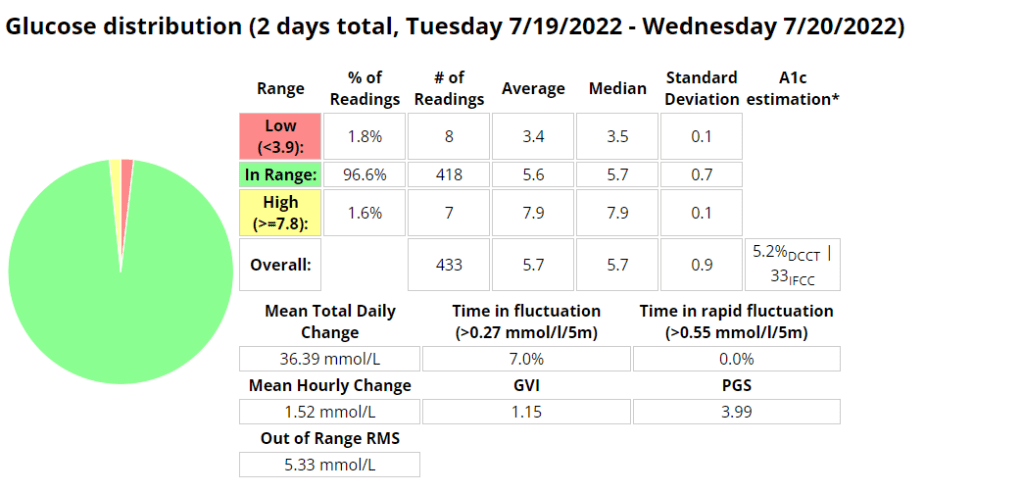
This graph shows the average blood sugar during training vs. my blood sugar from the Gold Coast Half Marathon.
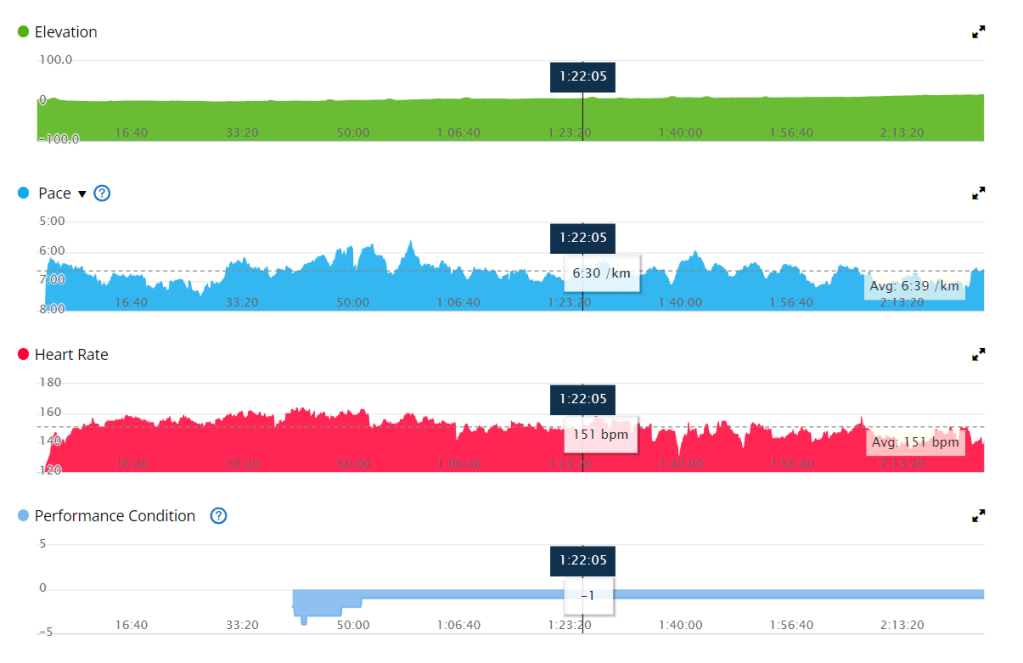
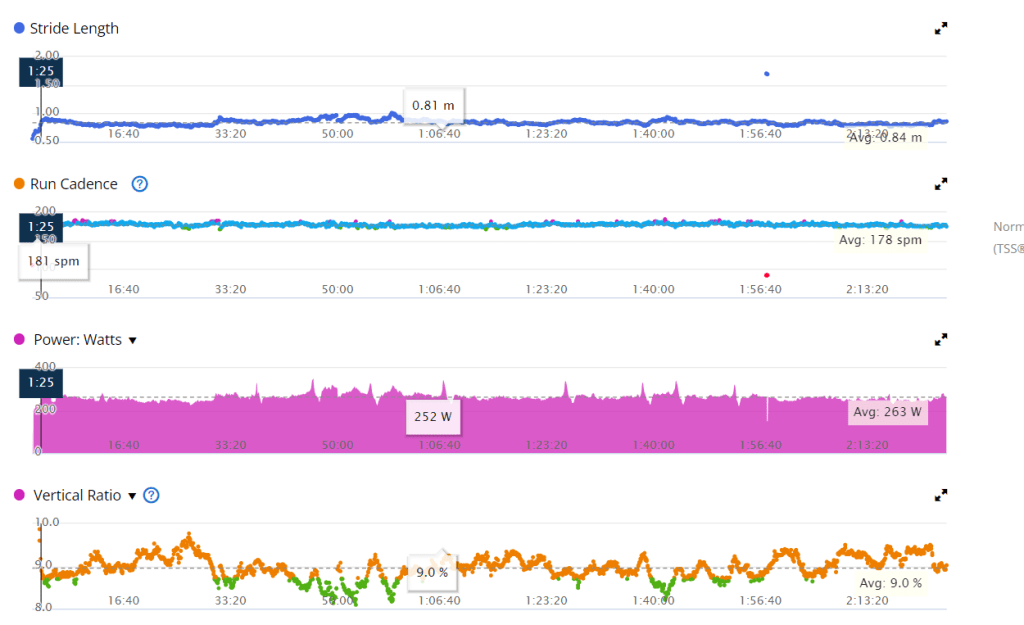
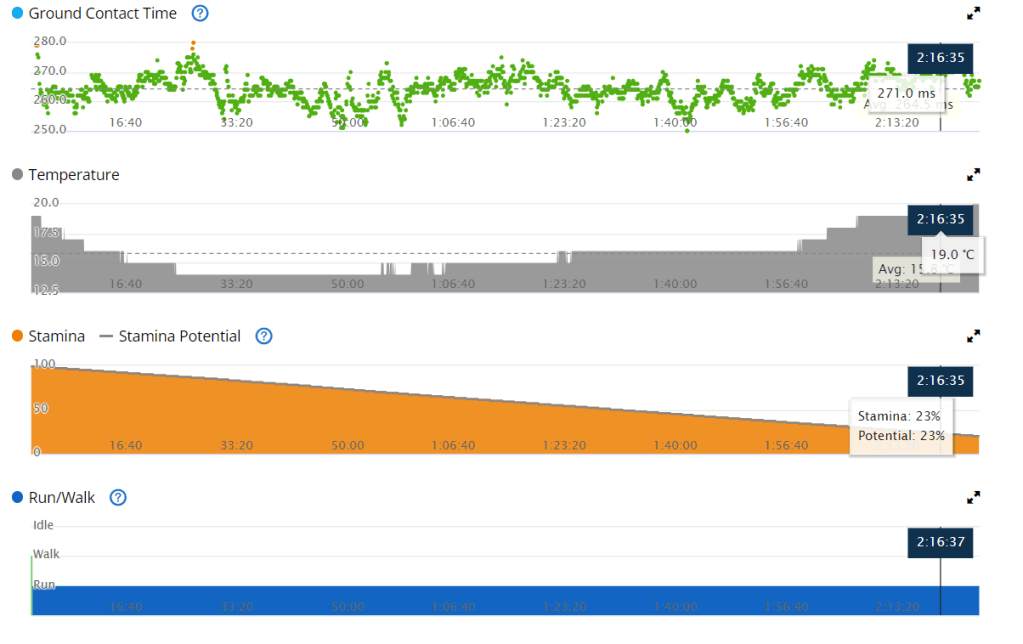
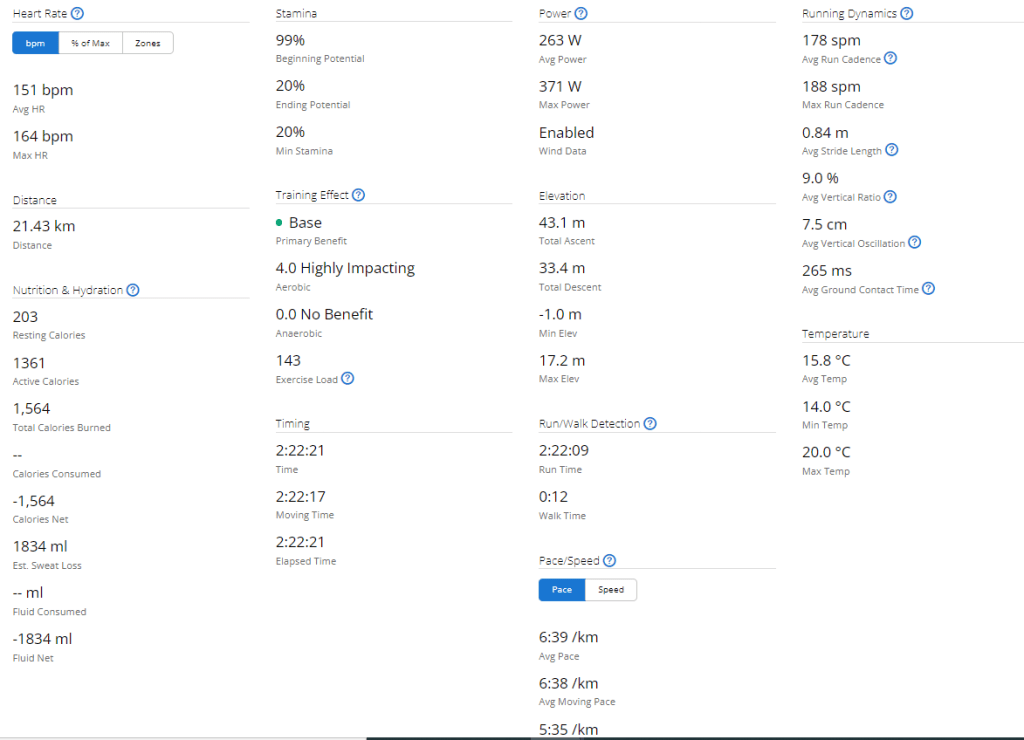
Training vs. RaceAverage distance (km)Average time (min)Average HR (bpm)TIR (3.9 – 7.8)Average Blood Glucose (mmol/l)Coefficient of variation (%)Pace
Training 149215692%5.8146:40
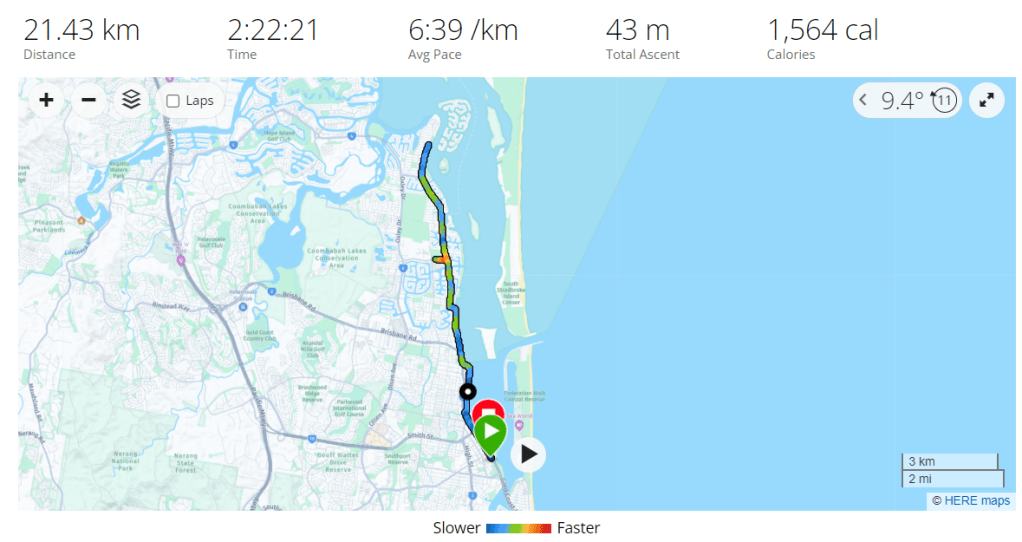
Race21.414015121.4%9.922.546:39
This table shows the average metrics during training vs. the same metrics during the Gold Coast Half Marathon.

Blood Glucose Management: Pre-Race Strategies: To optimize your blood glucose levels during a race, careful planning and preparation are key.

Here are some strategies to consider:

  1. Race Day Automation: If you use an insulin pump or automated insulin delivery system, consider setting up a race day automation plan. Gradually reducing your insulin on board (IOB) and raising your blood sugar target before the race can help mitigate the impact of the dawn effect.

The automation I use if I plan on exercising at 06:30am. I use 05:00 – 06:00 so that if another automation is active at 05:00am there is opportunity for this automation to run after that one completes.
  1. Timing of Pre-Exercise Snacks: To align the digestion of carbohydrates with the energy demands of the race, it is important to time your pre-race snack appropriately. If your blood glucose is around 5 mmol/l before starting, consuming a carbohydrate-rich snack approximately 15 minutes before the race can help maintain stable blood glucose levels, in my experience cliff bars have the perfect amount of nutrients for a long run.
  1. Managing Blood Glucose During the Race: Once the race begins, various factors can influence your blood glucose levels.
  1. Here are some considerations to keep in mind:

    Listen to Your Body: Pay attention to any signs or symptoms that may indicate fluctuations in your blood glucose levels during the race. Feeling lightheaded, fatigued, or experiencing unusual thirst may indicate the need for carbohydrates. Regular Blood Glucose Monitoring: Carry a portable blood glucose meter to monitor your levels throughout the race. This will enable you to make timely adjustments and take appropriate remedial actions when necessary. Carbohydrate Consumption: Plan to consume carbohydrates during the race to maintain your blood glucose within a desirable range. Experiment with different forms of carbohydrates, such as gels, sports drinks, or energy bars, to find what works best for you. Remember to consider the impact of any exercise-induced insulin sensitivity and adjust your carbohydrate intake accordingly.

Data Extract from AAPS.

Post-Race Recovery: Upon crossing the finish line, it’s essential to prioritize your recovery and address any pain or discomfort that may have emerged during the race. Be mindful of the following:

  1. Musculoskeletal Discomfort: Races can place significant stress on your body. Pay attention to any pain or discomfort in your muscles, joints, or tendons. Consult with a healthcare professional if necessary to address any post-race injuries. Blood Glucose Check: After the race, continue monitoring your blood glucose levels as they may fluctuate due to post-exercise hormonal responses. Adjust your post-race nutrition and insulin dosages accordingly.

Conclusion: Participating in a race as a person with diabetes requires careful consideration of blood glucose management strategies. Understanding the impact of waking up on hormonal levels, adjusting your approach accordingly, and incorporating remedial actions during the race are crucial steps towards maintaining stable blood glucose levels. By staying vigilant, prepared, and responsive to your body’s needs, you can conquer the challenges of a race while managing your diabetes effectively.

References:

  • American Diabetes Association. (2021). Diabetes and Exercise. Retrieved from https://www.diabetes.org/healthy-living/fitness/exercise-and-type-1-diabetesGupta, L., Khandelwal, D., Singla, R., Gupta, P., Kalra, S., & Dutta, D. (2017). Dawn Phenomenon and Its Impact on Blood Glucose Control. Indian Journal of Endocrinology and Metabolism, 21(6), 901–909. doi: 10.4103/ijem.IJEM_284_17

Exercise stats from Garmin
Equipment

Equipment NameNote
Osprey duro 6 – Hydration packThis hydration pack is a great option for long runs or cycles. It holds 1.5 liters of water, which is more than enough for most people to drink on a 2+ hour activity. It also has multiple pockets at the front of the vest, which allow you to store food, your phone, and your blood glucose meter. This makes it easy to access your essential items while you’re running or cycling.
Glucose gelsMy general rule of thumb is bring at least twice the amount you expect you will need.
Cliff barThe cliff bar was a new addition to my nutrition. These bars seemed to work well to stabilise blood glucose and I required no additional carbs for most runs between 14-18km.
Blood glucose meter + extra stripsIf my sensor were to fail or I was to become dehydrated enough that my CGM reading was inaccurate I wanted to be able to assess my blood glucose.
DexcomContinuous glucose monitor. I ensured this had at least 24 hours to settle before the race. This way readings would more accurate.
Android APS phone The phone that contain my artificial pancreas system.
Onmipod DashBluetooth enabled insulin pump, allowing me to use Android APS. I ensured that I inserted the pod at least a day before the race so I had enough time to identify issues.
Brooks Ghost shoesA comfortable pair of shoes you have tested and run in prior to the race. I still developed blisters so its imperative you get the correct size.
Asics running socksA comfortable pair of socks.
HatA hat to ensure I don’t burn.
earbudsTo enjoy some music while I run.

Training

To prepare for the Gold Coast Marathon I did the following exercise;

Exerciser TypeCountDistanceHourAverage heart ratecoefficient of variation (%)Average blood glucoseAverage time in range
Run4127630150 bpm | 2.6 z9.68 6.680%
WeightTraining105109 bpm6.2684%
EBikeRide81428134 bpm156.873%

Featured

Thirty day challenge – week 3

Summary

I am starting to feel like a routine is forming, perhaps not around diet yet, but definitely in regards to training. In previous years of doing this I was eating clean most days, as it provided improved diabetic control in the absence of an APS/AID and pump.

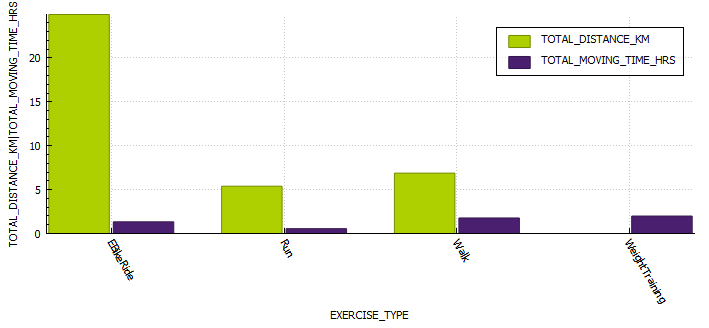
This week was particularly heavy due to my birthday dinner, a new phone, a new version of AAPS (Boost test platform 3.6.5) and a 25 km cycle. *I have been unable to pair my galaxy watch with my new phone, which is sad as I really liked the watch and having the plethora of sensors.

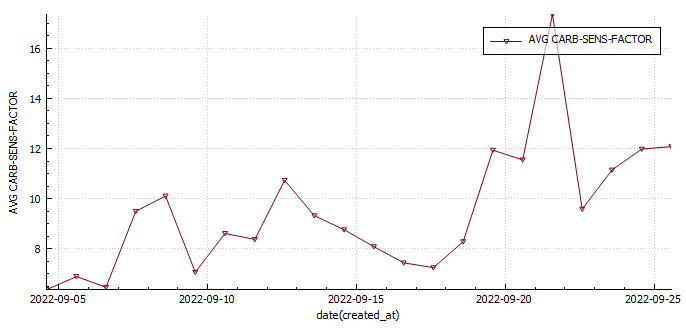
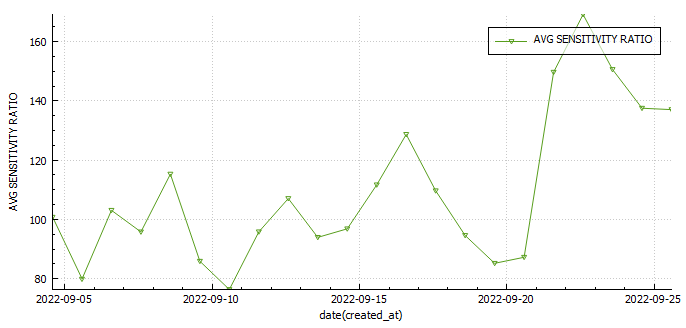
I was investigating the possibility of measuring insulin sensitivity changes in AAPS . One way would be to use the autosens feature in AAPS , but since I wasn’t including the carbs I ate to fix hypos, and I was snacking in-between to keep my readings steady that wasn’t going to work. The only metric that may prove useful may be my carb sensitivity factor (CSF). The average CSF over the 22 days so far is 8.7 while the average sensitivity ratio was 106%. This would mean that according to CSF I was 36% more sensitive to carbs yesterday or 29% less sensitive according to autosens.

Body Metrics

StartWeek 1Week 2Week 3Week 4
Weight (kilograms)75.8747574.1
Body fat percentage (according to Samsung)17.3%17.8*
Body fat percentage (according to the navy seal calculator)15%15%14.8%
Total volume
Table stating the weekly body metrics I am tracking.

Exercise

Week 1Week 2Week 3Week 4
Distance (kilometres)25.1720.5437.22
Activity (hours)4.343.655.64
Table stating the weekly exercise metrics I am tracking

Nutrition

Screenshot of average macro-nutrients consumed during week 3

Diabetes

Week 1Week 2Week 3Week 4
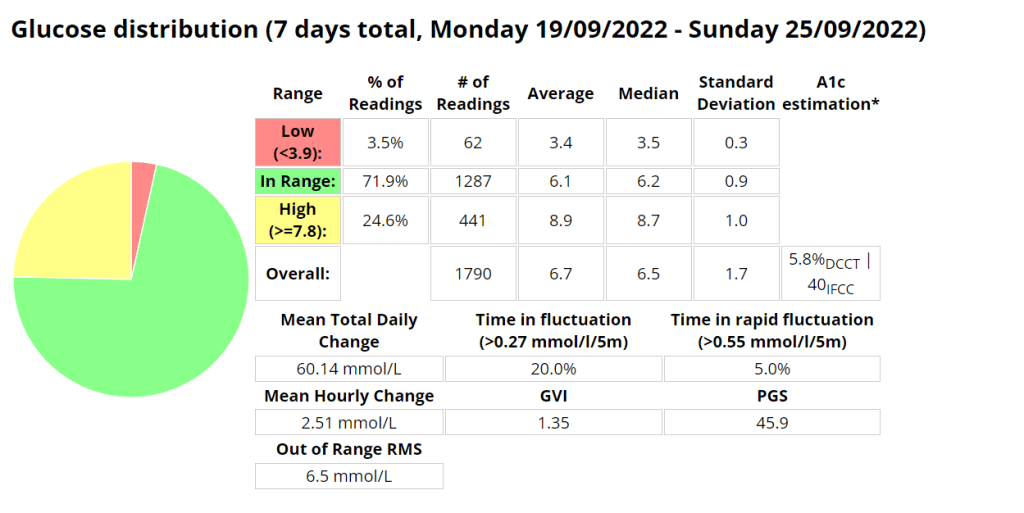
Low (<3.9) (%)0.90.63.5
In Range (3.9-7.8) (%)75.374.771.9
High (>= 7.8) (%)23.824.724.6
Standard deviation (SD) 1.31.71.7
Average (mmol/l)6.87.0 6.7
A1c estimation (%)5.96.05.8
Table stating the weekly diabetic metrics I am tracking.

Ideally I want to see a time-in-range (TIR – 3.9-7.8 mmol/l) exceeding 90% with an average in the low sixes and a standard deviation (SD) around one (1).

Omnipod Dash

I decided to purchase the Omnipod Dash trial pack of 10 pods for $30 AUD to see what all the hype was about. It turns out the hype is warranted, as this is an incredible little system. I’m very excited to use the device under a multitude of conditions and I hope that my experience can be informative. My main testing criteria will be connectivity, recovery in the unlikely event a Pod is damaged, robustness during various activity, water resistance and general day-to-day activity including time with my two year old daughter.

Benefits

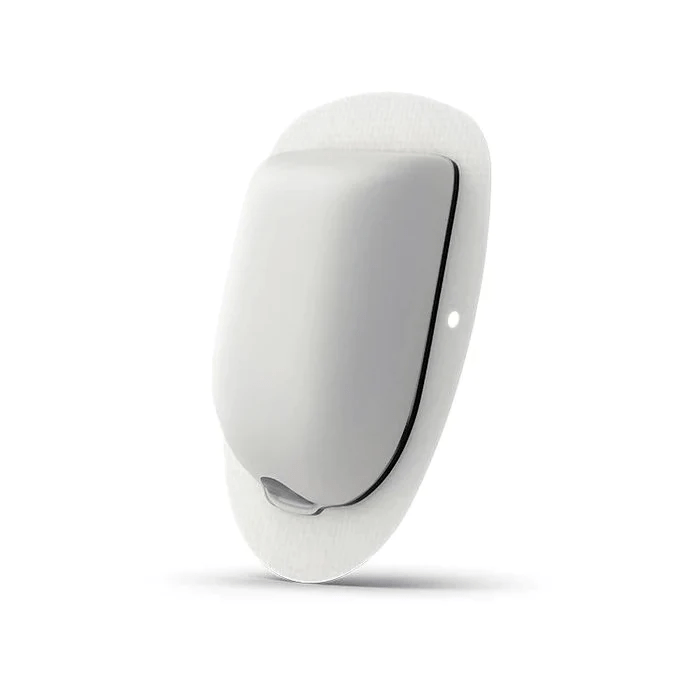
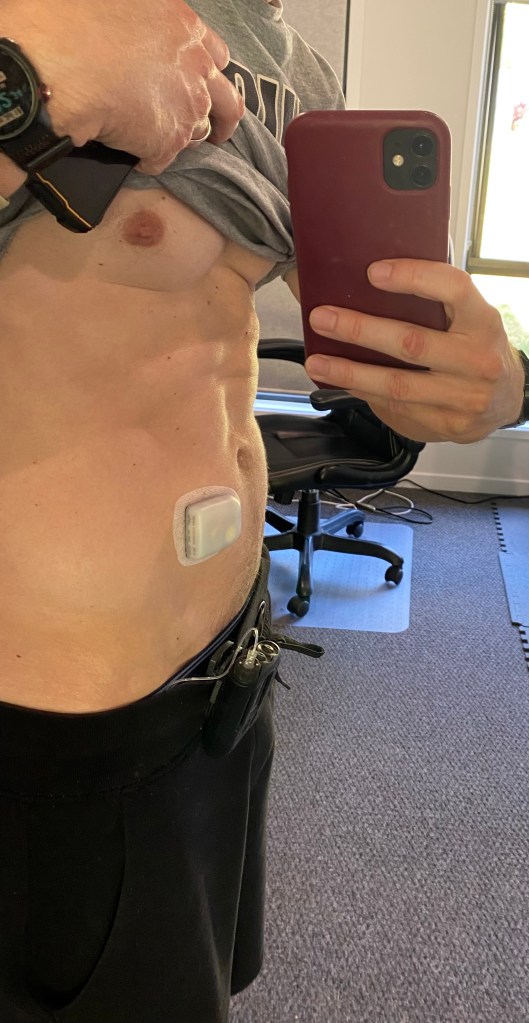
The pump system operates much the same as any other pump system available, with the main difference being that the pump and cannula are all part of the same physical unit. This is a huge advantage for sports, but can be noticeable while changing clothes, going to the toilet or during sexy time. The unit is so small its presence is barely noticeable.

Omnipod Dash.

Sugar Management stats (So far)

I am very pleased (and surprised to be honest) that I am using 28% less insulin on the Pods with improved (+9.3%) blood sugar control (Time in Range 3.9-7.8 mmol/l). I noticed far fewer super micro boluses (SMBs) being administered than before, but maybe that is due to me letting AAPS do more of the work in managing my sugars through unannounced meals (UAM).

Management Stats from Nightscout for the duration of the experiment so far. TIR = 3.9-7.8 mmol/l
Total daily dose (TDD) and carbs average for the duration of the experiment.

Note: I am not adding in all the carbs I am eating as I am using announced meals in AAPS.

The Ambulatory Glucose Profile (AGP) enables retrospective analysis of dense data, trends and
patterns for the duration of the experiment.
Management Stats from Nightscout for the week prior to the experiment so far. TIR = 3.9-7.8 mmol/l
Total daily dose (TDD) and carbs average for the week prior to the experiment.
The Ambulatory Glucose Profile (AGP) enables retrospective analysis of dense data, trends and
patterns for the week prior to the experiment.
Management Stats from Nightscout for the duration of the experiment so far. TIR = 3.9-10 mmol/l
Screenshot from AAPS highlighting the SMB’s.

Android APS Setup

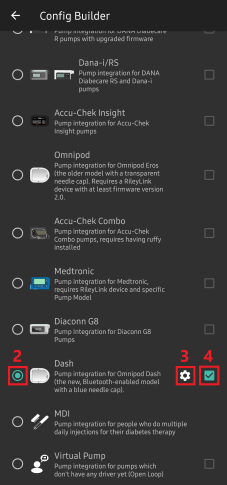
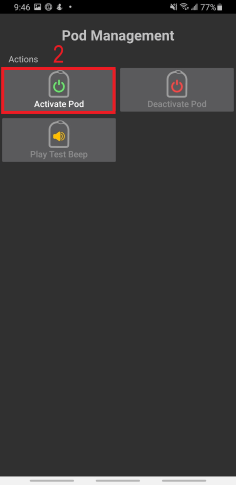
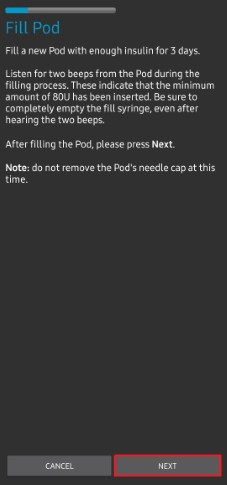
Setup of the Pod system in Android APS (AAPS) Boost Master 3.6.4 was surprisingly easy and intuitive. I just followed the Prompts after going to the configuration builder and selecting Dash as the pump.Its a very similar process for Eros pods, with the added requirement to pair the OrangeLink / RileyLink device.

Setup Instructions

Installed Pod

Installed Pod
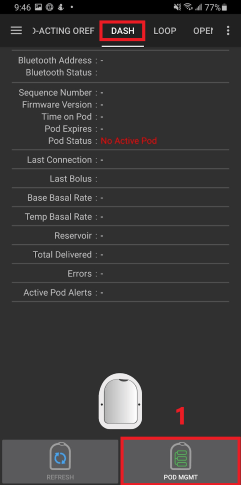
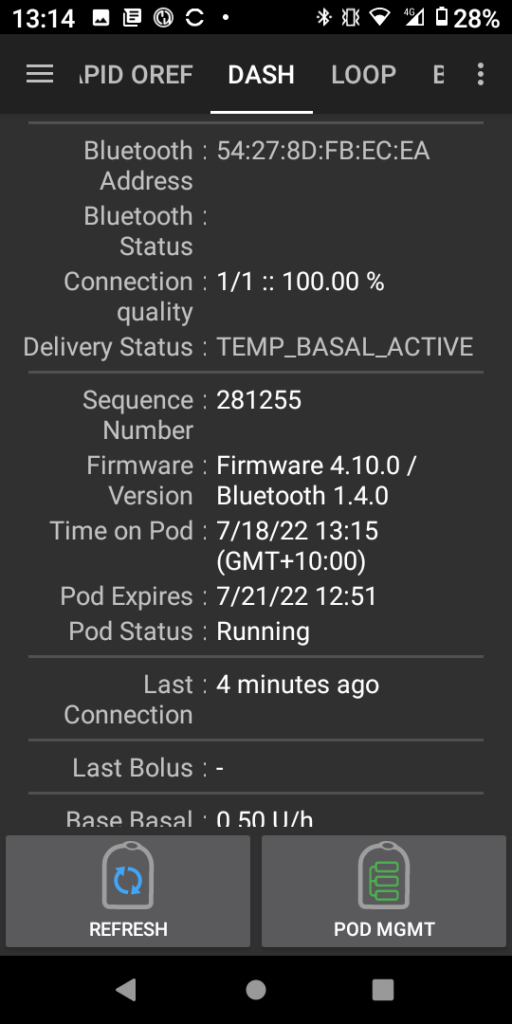
Dash page within AAPS
Dash page within AAPS.

Errors

I had an error starting the pod, but after hitting retry multiple times the pod activated and all was working as expected

Exercise

Exercise has been a lot more enjoyable without all the wires and having to worry about pump placement or damage. If I mountain bike and fall off (which happens every now and again) I lose one pod, and not an entire pump. Having more pocket space and less to carry is an added benefit.

Whats next?

I plan to test the pod while resistance training, mountain biking, running and the most intense sport I play, wrangling my two year old. If she cant destroy them, they are indestructible 🙂

Loop (FreeAPS) to Android APS (AAPS) – 3 Week Review

On the 04 February 2022 I decided to switch from FreeAPS (Loop) over to AAPS. At that point I had been successfully looping for 6 months with FreeAPS (Loop) but I wanted to get some experience with the oref1 algorithm in the hopes of fine-tuning my diabetes management during sports and to try out unannounced meals.

I was conflicted in the beginning as I was seeing results consistent with my goals on FreeAPS (Loop), but It was something I wanted to try. I am glad that I did.

The first few weeks on AAPS can be painful as you learn the system and go through the objectives. I had completed as many as I could using a virtual pump so It wasn’t long before I was able to close the loop again this time using AAPS. I expect my numbers will improve once again when automations are available to me.

Setup and Configuration:

For the first few days I was still using the Dexcom IOS app as my collector app sending my BG readings to the King King Mini 2 (KKM2) to be processed by AAPS, this worked well as I was always in areas with reception. I did this because I wanted to be able to switch back to Free-APS quickly if I decided that AAPS wasn’t working for me. The first sensor on the KKM2 I paired with xDrip+. I loved xDrip as it provided heaps of additional data, but I had issues with delayed and missed readings. I have now switched to the the Dexcom BYOD app and this seems to be proving readings more consistently. I am using an Anubis transmitter but I am unable to validate battery level with the Anubis Tool on the KKM2.

Stats:

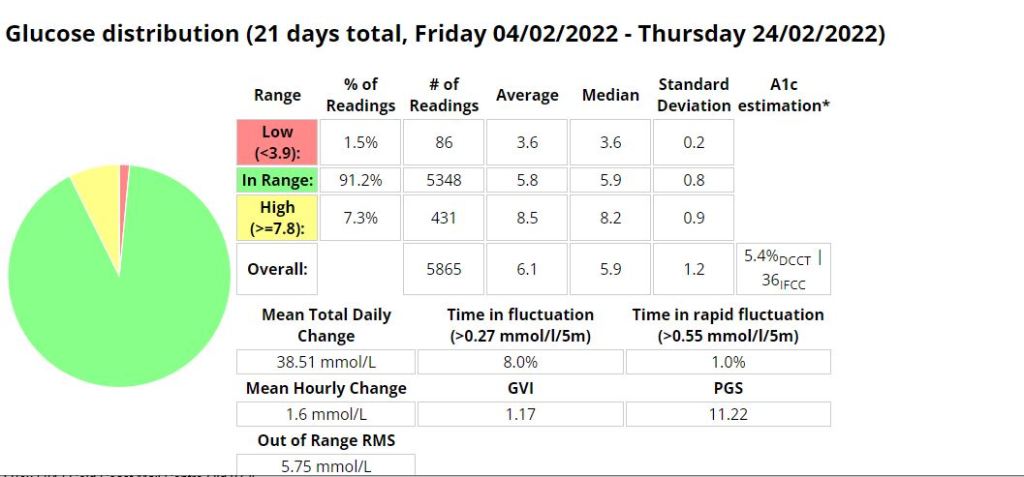
Last 22 days on Loop (FreeAPS)

First 21 days on AAPS

Likes:

  • Improved Time-in-range (TIR) (+7.7 %), average blood glucose (-0.2 mmol/l), GVI, PGS and A1C even though AAPS was new to me and I was still figuring a few things out. I achieved this exercising less than I usually do due to weather.
  • Better control with less work.
  • More flexibility – The ability to scale and tailor your meal or correction dose is awesome (include trend, IOB, COB, correction percentage and your blood glucose readings in the the calculation for increased control and precision).
  • Fewer (0.2% less) low events.
  • Quicker to respond to bring high blood sugars down.
  • Unannounced meal management (UAM) using the Oref1 algorithm (not tested).
  • No Apple Developer licence fee (I paid less for my KKM2 than I was paying for my annual developer license).
  • Easier to setup and deploy to the KKM2 than the Free-APS (Loop) app.
  • Remote (SMS) bolus.
  • The ability to super bolus (include basal for a specific period with a bolus).
  • Super micro bolus’ (SMB) are more effective at dealing with gluconeogenesis from high protein meals.
  • Autosens has been useful by identifying periods of insulin resistance or sensitivity and adjusting basal accordingly.

Dislikes:

  • My pump (Medtronic 522) is using batteries more frequently (60% quicker on AAPS).
  • Bluetooth (BT) drop-outs more frequently than loop. In the last 21 days I have had 6 ‘Pump unreachable’ errors and 3 ‘Missed BG readings’. This resulted in elevated blood glucose during the evening.
  • The KKM2 battery drains faster when I am around multiple other Bluetooth enabled devices than what the iPhone did.
  • The connection between the Phone (King Kong Mini 2) to the Orangelink and pump seems a little less stable than with the with the iPhone and loop, but I suppose you can expect a far inferior Bluetooth chip on a phone that costs a 10th of the price. This is easily remedied by restarting the Orangelink , turning BT on and off or in some cases, usually with the the pump unreachable error, I had to restart my phone.
  • I really liked the ICE (Insulin Counteraction effect) data in Loop. It was useful to see where I went wrong with my previous bolus and AAPS doesn’t have this data readily available like Loop did. If you were using UAM it would be unnecessary.